Tuesday, 12 February 2019

Help your authors increase the impact of their work

Source: https://authorservices.wiley.com/editors/enhancing-discoverability/supporting-author-self-promotion.html
Help your authors increase the impact of their work

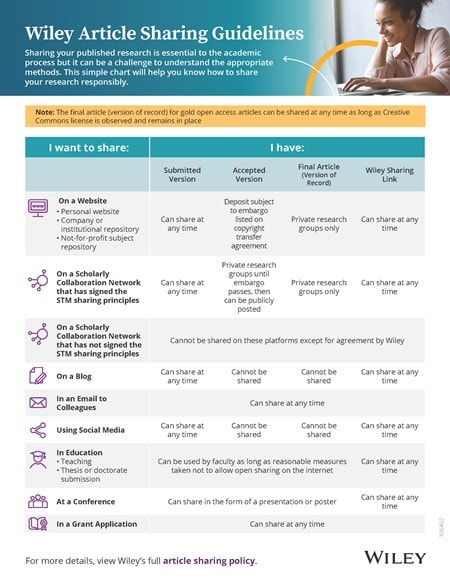
Sharing guidelines for Wiley journal articles The most effective person to promote an article is the author.

We've created a one-stop shop promotional toolkit to help authors maximize the impact of their research.

Share our promotional toolkit with your authors to help them maximize the impact of their research.

Measuring impact

Wiley helps authors measure the impact of their research supported through our specialist partnerships with Kudos and Altmetric, as well as citation tracking on Wiley Online Library.

Article sharing

Authors can share their article at any stage of publication - ways in which they are able to do this are detailed below.

Authors can share any version of your article with individual colleagues and students if you are asked for a copy, as part of teaching and training at your institution (excluding open online sharing), and as part of a grant application, thesis submission, or doctorate.

For public sharing of your article, see below, or read our full article sharing policy.

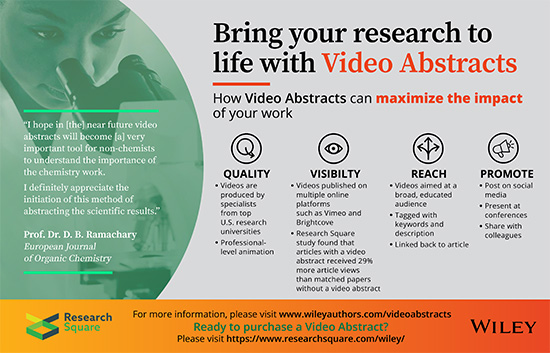
Share your research with videos

Source: https://authorservices.wiley.com/author-resources/Journal-Authors/Promotion/video-abstracts.html

Share your research with videos

Extend the reach and visibility of your research by creating a video abstract or video byte. For a fee, Wiley—in partnership with Research Square—offers you the opportunity to outline the key findings of your published article in a dynamic video. Through this multimedia content, colleagues, funders and anyone else interested in your work can experience your research anytime, anywhere.

What are video abstracts and video bytes?

Video Byte Video Abstract


A 1-minute overview of your work and how it impacts society, geared towards a lay audience. A 2-3 minute animation briefly explaining your methods and findings and the contribution of your research to the field, geared toward a broad, scientifically literate audience.
Find out more

What's in it for you?

Watch the video and view the flyer below to learn more about how video abstracts can help you to maximise the impact of your research.


Frequently Asked Questions

  1. What are video abstracts and video bytes?
  2. How do I order a video abstract or video byte?
  3. Who creates my video abstract or video byte?
  4. How much does it cost?
  5. How can I further promote my video?
  6. What will my video abstract or video byte be used for?

  1. What are video abstracts and video bytes?

  2. A video abstract is a 2-3 minute, professionally animated and narrated synopsis that briefly explains your methods and findings and the contribution of your research to the field. Video abstracts are geared toward a broad, scientifically literate audience.

    A video byte is a 1-minute overview of your work and how it impacts society, geared towards a lay audience.

  3. How do I order a video abstract or video byte?

  4. You can order your video abstract or video byte directly from Research Square, or you can log in to your Author Services account and click on the "Make Video Abstract" button which is present for participating journals.

  5. Who creates my video abstract or video byte?

  6. Research Square. They are an organisation composed of writers, voice-over artists, illustrators, and animators with graduate-level scientific training from top US research universities. Your article is matched with a scientific writer who will read your manuscript and write a short script describing your discovery and why it is important. You will be asked to provide feedback and final approval on the script for your video, ensuring that you’re involved with production from beginning to end.

  7. How much does it cost?

  8. The price of a video abstract is $1,500 USD. A video byte is $300 USD. Please keep in mind that additional script and video revisions may result in additional costs.

  9. How can I further promote my video?

  10. Wiley provides you with 7 promotional tools to help ensure your work gets seen, read, and cited! For more information, please visit our Promotional Toolkit page.

  11. What will my video abstract or video byte be used for?

  12. You are welcome to share your video abstract or video byte with your institution, at conferences, on your group’s website, via social media, etc. In addition, Research Square will post your video on their social media channels, and Wiley may also do so. For journals enrolled in the video abstracts program, videos will be posted in the journal's Video Abstract Gallery on Wiley Online Library.

Video Abstracts benefits

For more information, visit the video abstracts website.

How to maximize the visibility of your journal

Source: https://authorservices.wiley.com/editors/enhancing-discoverability/index.html

How to maximize the visibility of your journal

No matter how great the research in your journal is, it will only have impact if researchers, librarians and the general public find it. So how will your audience discover your journal?

Wiley works hard to increase the visibility of your journal and support authors in promoting their research. But here are a few things you can do to maximize your journals' discoverability.

Sunday, 10 February 2019

5 steps to improving your research visibility

Source: https://authorservices.taylorandfrancis.com/5-steps-to-improving-your-research-visibility/

5 steps to improving your research visibility

Where to begin...

Early career researchers (ECRs) are well aware academia is a competitive field. These days, ECRs face many challenges as they look to build their publication record, reputations and careers. It may be uncomfortable at first, but learning how to self-promote can help you build your brand and open up a new world of opportunities – even ones outside academia.
So what can you do to make you and your work more visible? Read on to learn how to take those first steps.

Step 1: Self-assess (Prep time: 1 hour +)

You are a brand and when building your brand, there are two essential points to remember: be authentic and be consistent.
First, consider your natural style. Don’t try to be overly friendly if you are reserved, too cool if you are eccentric. Play to your strengths.
Second, brainstorm why you want to improve your brand. Is it to improve your reputation generally? To receive invitations to give keynotes? In order to be sought after for consulting opportunities?
Third, think about the future. How would you describe your work now and what are your future interests? Is there anything you don’t do currently but want to do?
Taking the time to think through these points will help you understand the tone you want to set and the image you want to project. It may be useful to organize your points into handy notes for referring to later – it will make it easier to stay true to your goals.

Step 2: Write your story (Prep time: 1 hour +)

No one knows you better than yourself. The challenge is to distill how you want to present yourself into short biographies. It will help to have the following:
1. A short bio (1-2 lines)
2. A longer bio (1-3 paragraphs)
Short bios can be used on social media sites such as Twitter. Here is an example:
Andrew Jones @AndyBeetroot
Professor of Applied Physiology & Associate Dean, Exeter University. Exercise physiology, sport science, nutrition, training, performance, Gary Numan.
Longer bios can be used on LinkedIn, personal websites, conference programmes, when signing off on an article and more. See an example from Andy Miah.
You want people to find you by directly searching your name yes, but also by topical searching, so don’t forget keywords and/or hashtags.

Step 3: Take your best shot (Prep time: 30 minutes +)

If you want to build a recognizable brand, it will help to have a recognizable image. When starting out, all you need is one good headshot. Whether you recruit a friend with a DSLR or a family member with a camera phone to take your photo, remember to be aware of your background. Why not try choosing one with some detail, rather than a plain background? A university campus courtyard or interesting building could be good options.

Step 4: Build your web presence (Prep time: 1 hour ++)

Now that you have determined your vision for your brand, crafted your bios and taken your perfect headshot, it’s time to get your brand out there. There are many avenues to choose from, and don’t feel pressured to take them all on. Starting with a simple LinkedIn account can be a good first step – it’s simple to set-up, low maintenance, and useful (not all university webpages are easy to navigate!). It’s basically an easy way to share your CV, ideas, and updates on what you are doing or opportunities you are looking for, while allowing you to connect and engage with peers who are doing the same.
Other popular avenues include Twitter and blogs – click on the links for some ideas on where to begin.
Should you want to carve out a more defined space on the internet, consider having your own website. Jon Quah has a personal site to highlight his consulting work, while John Delury uses his to showcase previous publications, and media publications and appearances.

Step 5: Engage the media (Prep time: to be determined)

The fact is there is a lot of published research out there – over 50 million journal articles with that number expected to double every 20 years. If you think your research would be of interest to a wider audience, consider pitching to the media. Many are interested in stories from scholars.
While it can be difficult shifting from academic writing to a journalistic style, the results can be worth it. Take the example of Kim Yi Dionne, an Assistant Professor of Government at Smith College, as mentioned in The Guardian. A blog post she wrote for the Washington Post’s Monkey Cage blog went viral and resulted in academic opportunities such as a journal article, book chapter, and (indirectly) a National Science Foundation grant.
If this interests you, keep in mind that there are many different ways to accomplish this. The style and tone can vary depending on your publication outlet of choice. There’s a wealth of information online so you may need to do your own research to determine your approach, but the extra effort can be worth it. Take control of your brand and who knows where the opportunities may lead – you may just become the ‘go to’ person in your field.

Jennifer Lien is the Managing Editor for Taylor & Francis’ Social Sciences and Humanities journals in Asia Pacific. She is also the co-author of the business book Asia’s Entrepreneurs: Dilemmas, Risks and Opportunities (Routledge). Follow her on Twitter @lienje.

Research Impact & Visibility: Researcher profiles

Source: http://libguides.library.uu.nl/researchimpact/profiles

Research Impact & Visibility: Researcher profiles

Overview

On this page you will find a comparison chart of available research profile websites
You might try one or more of these:
  1. Create a Google (Scholar) account and activate Google Scholar Citations
  2. Create an ORCID account
  3. Create a ResearcherID
  4. Check your Scopus Author ID
  5. Create a ResearchGate acoount
  6. Create an Academia.edu account
  7. Create a Mendeley account
  8. Login to your UU-profile and make it richer
</>

Hands on workshop

On request the library organises hands on workshops for UU research groups and graduate schools. Interested? Get into contact.
</>

Actions to enhance your visibility

There are many things you can do to enhance the visibility of your research:
  • Analyse who is using your research and through which channels
  • Avoid journals that are not well-indexed
  • Create an ORCID
  • Blog and tweet selectively on your research topics
  • Deposit your publications in the university repository
  • Produce a short video pitch on your main research topic
  • Publish Open Access
  • Share an early version of your paper as pre-print (ArXiv, bioRxiv, preprints.org, Cognet, RepEc, SSRN, PeerJ Preprints etc.)
  • Share your data (FigShare, Dutch Dataverse network etc.)
  • Upload full text of your papers to your researcher profiles or your own website
  • Use a stable and full author name and affiliation
  • Use research profiles to unambiguously link publications to you
</>

Why should I care about my online presence?

  • To make your research and teaching activities known
  • To increase the chance of publications getting cited
  • To correct attribution, names and affiliations
  • To make sure that a much as possible is counted in research assessments
  • To increase the chance of new contacts for research cooperation
  • To increase the chance of funding
  • To serve society better
</>

Researcher profile sites & services compared

There are various types of sites and services that are important in fostering your visibility:
  • Author disambiguation services: ORCID and ResearcherID (and also DAI/NARCIS, VIAF and ISNI that are managed by libraries and registration agencies and require no user action from academics)
  • Personal sites and social media: Facebook, LinkedIn, own website, blog
  • Researcher Communities: Academia / ResearchGate
  • Reference managrment tools with social functions: Mendeley
  • Search engines with author profiles: Google Scholar, Scopus
  • University author profile pages: UU pages
Mendeley Google Scholar ORCID Researcher ID ScopusID Research Gate Academia edu* UU pages
publications list y y y y y y y y
publications linked y y y y y (poss.) (poss.)  (poss.)
publications metrics y y n y y y y n
soc. media links n n n n n y y n
bio, interests, affil y y y y n y y y
user accounts 201310 2.5 million ? >250K ? na ~3 million 4.9 milllion all UU
user accounts 201410 > 3 million ? >950K ? na ~5 million >14.6 million all UU
Utrecht users 201210 229 437 ? 273 na >1000 986 all
Utrecht users 201303 ? 585 ? 276 na 2304 1295 all
Utrecht users 201310 (incl. UMCU) ~1500? (Jan 2014) 678 ~80 376 na 3036 1401 all
Utrecht  users 201410 (incl. UMCU) ? 968 476 (UU only) 478 na 3648 3013 all
Utrecht users 201704 9449 all
uploading papers y n n n n y y y
adding publication data manually y y y n n y y n
adding publications (semi)automatically many search engines + import RIS or BibTeX Google Scholar Crossref + Scopus + RsearcherID + DataCite + PubMedCentral Europe WoS + ORCID Scopus PubMed + IEEE + CiteSeer + RepEc + BMC Crossref + Microsoft AS+ PubMed + ArXiv Metis / Pure
* Academia figures include students and alumni
There is also a training available to learn more about researcher profiles


</>

More visible with Google Scholar Citations in three steps

Whether you like it or not, Google Scholar is by far the most widely used bibliographical tool for scholarly publications. It has a problem however, and that is metadata control. You can enhance your findability by creating an account and telling Google which publications in their database are yours. After taking these steps searches on your name will show your profile on top of the results. The profile itself shows your list of publications in Google Scholar with basic metrics. Besides journal papers, it may also include books and reports.
  1. If you do not yet have a Google account, go to Google and create it.
  2. Go to Google Scholar, make sure you are logged in and click "My Citations"
  3. Follow instructions to create your profile and add or remove publications that are yours or not yours
NB Because new articles are automatically added to authors' profiles it is wise to check regularly, because in rare cases articles may be wrongly attributed to you.
</>

More visible with ORCID in three steps

ORCID (Open Researcher and Contributor ID) is a non-proprietary, international ID that provides you with a persistent digital identifier that distinguishes you from every other researcher. It is strategically important because it enables all databases to automatically link publications to you by your ORCID. At ORCID you can create a profile, link it to your Scopus ID, ResearchID and/or import publications from a so-called crossref search. Further functionality is being developed.

  1. Go to ORCID, register for an ORCID ID (under "for researchers") and complete your profile
  2. Click "import research activities" and follow instructions to import publication details from e.g. Scopus
  3. Click "view public ORCID record" to check whether it does not show anything you do not like to be publicly visible
</>

More visible with a ResearcherID in three steps

ResearcherID is the profile tool from Thomson Reuters, the owners of Web of Science and the Journal Citation Reports. Researcher ID offers a public profile. You can choose what to show publicly. Researcher ID is also important as a basis to provide feedback to Web of Science for grouping author name variants or corrections to affiliations.
  1. Go to Researcher ID, sign up and complete your profile.
  2. Add some publications if you have a few listed in Web of Science and preview the public version of your profile.
  3. If you already have made an ORCID ID you can link Researcher ID to that. It is best to do that in a place where you have access to Web of Science.
</>

More visible by checking your Scopus Author ID in three steps

The Scopus Author ID is not a researcher profile site, but helps author recognition and disambiguation when searching publications. Many researchers already have a Scopus ID without realising it. By checking the correctness of publications assigned to your Scopus Author ID, you will certainly help others finding your stuff. It will also improve completeness and correctness of citation analyses. And it also improves feeds of your publications list to be shown on other sites.
  1. Go to Scopus and use the author search tab to search for your own name
  2. Check if all publications assigned to you are correct and if there are no variants of your name that are not yet grouped to your main entry.
  3. If there are ungrouped name variants with your publications send Scopus feedback by checking name variants and clicking "request to merge authors" on top of the results list. (For that it may be required to create a personal account within the institutional license).
</>

More visible with Researchgate in three steps

ResearchGate is a very large (originally German) researcher community linking researchers around topics. It is frequently used to ask questions to collegues all over the world that have the same set of interests and specialisations. You can choose which topics or researchers to follow. You can automatically populate your publications list or add items from reference management tools or add manually. You can even upload and share full text publications (e.g. last author versions that many publishers allow you to share).
  1. Go to Researchgate, sign up and complete your profile with whatever you think relevant.
  2. Add your publications by clicking add publications" and choosing "author match".
  3. Select one or two topics to follow if you want
</>

More visible with Academia.edu in three steps

Academia.edu is a large researcher community. Just as ResearchGate it connects scholars around topics. You can add papers through a built in search using Microsoft Academic, PubMed and ArXiv. You can also add ful text. The process is easy, but the coverage not as comprehensive as Google Scholar.
  1. Go to Academia.edu and sign up.
  2. Add publications/papers by clicking your name top right, then "add papers"and "import"
  3. Find a few people in your field to follow
</>

More visible with Mendeley in three steps

One of the steps towards visibility and efficient reference management is a Mendeley account. Mendeley is an Elsevier-owned reference management tool that is used by millions of researchers, offers immediate readership statistics and has strong social functions. Probably many of your publications are already present in the Mendeley database, but with your own account you can make sure that all of them are. And you can do much, much more.
  1. Mendeley, make an account.
  2. Complete your profile
  3. Add publications:
    1. (PDF-)files of (your) papers on your hard drive (in one go)
    2. references from a search in Google Scholar or another bibliographic database
  4. Start building a network of colleagues or (open or closed) groups
Of course, for the reference management function of Mendeley there are many alternatives, such as Zotero, Endnote, RefWorks and more. See the seperate guide on reference management.
</>

More visible with the Utrecht University profile pages in three steps

UU profile pagesThe Utrecht Unviversity staff profile pages are available since Spring 2013. You can add your CV, profile and list additional functions (free text). It also lists your publications as entered in the University Research Information System Metis. Often this is done for you by the faculty or department administration once every 3, 6 or 12 months. However, one thing you can do yourself is upload the full text of publications to make these more visible.
1) Go to your UU profile page and start editing by logging in top right. Add some text on tthe CV tab. Even just listing one or two current research projects, areas of expertise or subject keywords will help foster your visibility
2) Have a look at your contact information tab. Add links to your other profiles (Linked-In, Google Scholar, ORCID, Academia and others you may have). You can also choose to adds these links to the profile tab.
3) Have a look at your publication list. Are there titles of which you have the full text available to upload? It does help to do this. You can do this via your PURE account. Your publications will become available in the Utrecht University repository and by that will become easily findable with free full text in Google Scholar. That means they are available to scholars, professionals and lay people, even if they do not have access to the expensive journal plaforms. Yes, there are sometime copyright issues, but  the good thing is: the library always does a final copyright check. In some cases you are not allowed to upload the publisher version of papers, but are allowed to upload your last author version (after peer review but without the publisher's typesetting etc.)
</>

Field specific author profiles

</>