In order to improve the quality of systematic researches, various tools have been developed by well-known scientific institutes sporadically. Dr. Nader Ale Ebrahim has collected these sporadic tools under one roof in a collection named “Research Tool Box”. The toolbox contains over 720 tools so far, classified in 4 main categories: Literature-review, Writing a paper, Targeting suitable journals, as well as Enhancing visibility and impact factor.
Bibliographic codes, such as DOI, ISBN or ISSN are intended to uniquely and permanently identify a research product. They are required in the evaluation of the results of scientific research (VQR) and in addition they comply with the FAIR principles, making research data traceable, accessible, interoperable and reusable. It is recommended to insert these codes in the insertion of the research products in ARCA. Ca' Foscari provides a DOI code attribution service (non-commercial and reserved to University research outputs). ISBNs and ISSNs are usually provided by publishers.
DOI
The DOI - Digital Object Identifier - is an identification code, assigned to a digital object (article, journal, ebook, doctoral thesis, database, dataset), providing lasting and unique identification.
Each DOI is linked to a series of metadata,
i.e. bibliographic information such as author, title, publisher,
publication date, etc., for the digital object to which it refers.
The assignment of a DOI is provided by the Federation of Agencies coordinated by the International DOI Foundation, a non-profit organisation and registration authority that certifies the ISO standard (ISO 26324). The agencies provide technical support and ensure the preservation, quality and integrity of metadata and the DOI system.
ISBN
The ISBN - International Standard Book Number - is a 13-digit code that uniquely identifies the single edition of a printed or electronic book.
Responsible for assigning the ISBN codes for Italy is Italian ISBN Agency. Usually the ISBN code is automatically assigned by the publisher. However also authorpublishers can request ISBNs (membership fees) to the Agency.
The University does not offer an ISBN attribution service.
ISSN
The ISSN - International Standard Serial Number - is an 8-digit numeric code, which identifies the printed or electronic edition of a periodical.
Not all journals are equal, that is perhaps why we often want to
construct search strategies to filter down results to not only match a
list of specific keywords but also to ensure the results only come from a
specific set of journals.
Such search queries are often used to help support literature reviews or even review papers and/or can be used as saved alerts to help the researcher keep up to date with new research matching the search.
In general, regardless of database used you construct the Search strategy using the following Boolean Search pattern.
(Keyword1 OR Keyword2 OR Keyword3 OR...) AND (Journaltitle1 OR Journaltitle2 OR Journaltitle3 OR …)
While the logic of this is simple, in practice there are quite a few
pitfalls (particularly concerning the matching of journals titles) when
constructing such a search.
Because each database has slightly different search features, their issues might differ.
In this new series, we will share with you the tricks of properly
constructing such searches for a variety of popular databases such as Web of Science, Scopus and other databases or academic search engines.
Web of Science is a well-known cross disciplinary database indexing
mostly ‘prestigious’, high impact journals and is a popular choice for
running such searches.
That said if your target set of journals are large and goes beyond
the most popular ones, you may find Web of Science does not include
them. In such a scenario other more inclusive databases like Scopus or
even Google Scholar may be considered.
Tip #1 – create your own Web of Science personalized account once and use it to run and create saved searches
It is highly recommended to login to Web of Science and then register to create your own account.
Once you have registered your account, go directly to https://www.webofknowledge.com/
and sign in with your account. With a personal account, you can keep
track of searches you have done and reuse them when necessary. This is
very useful when you have long complicated queries or anticipate reusing
parts of such searches.
Advanced Note – While you can run your searches with a personalised account via the normal library proxied link,
for extremely long queries when there is a long list of journals or
keywords matched, the query may break because of excessive length. Going
directly to https://www.webofknowledge.com/ and signing in with your personal account without using the proxy helps reduce this issue.
Tip #2 – Check if and how much of your targeted journal is included in Web of Science
While it is tempting to just construct your search at one go, it is
recommended to build up your search step by step. The first step is to
ensure that your search is indeed correct and includes journals from
your targeted journals.
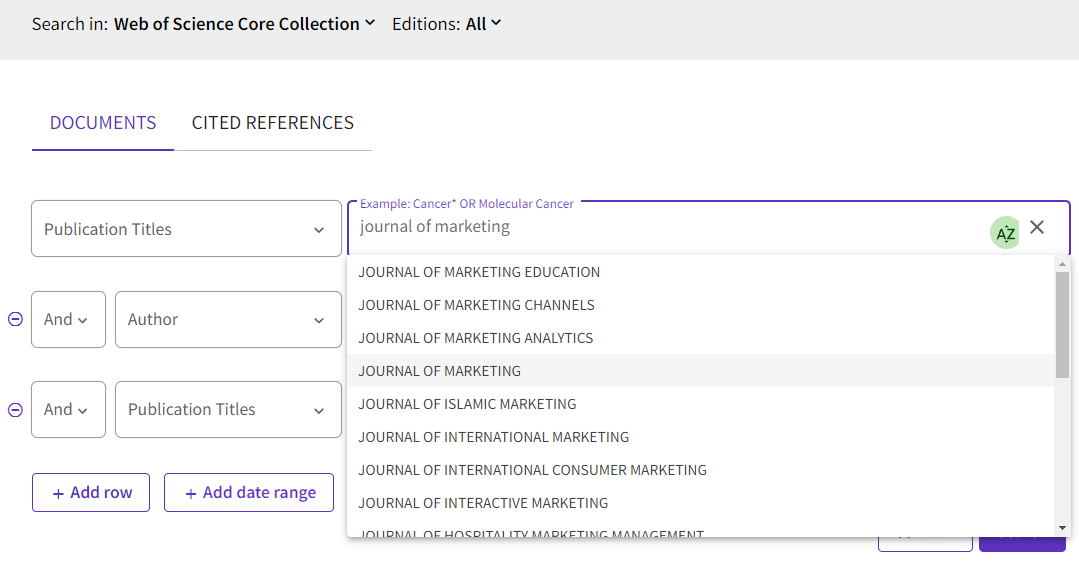
In Web of Science, you use the field “Publication titles” to match journal titles. So, enter your journal title one by one to check.
On paper this seems straightforward, enter the title and the system will auto suggest possible matches.
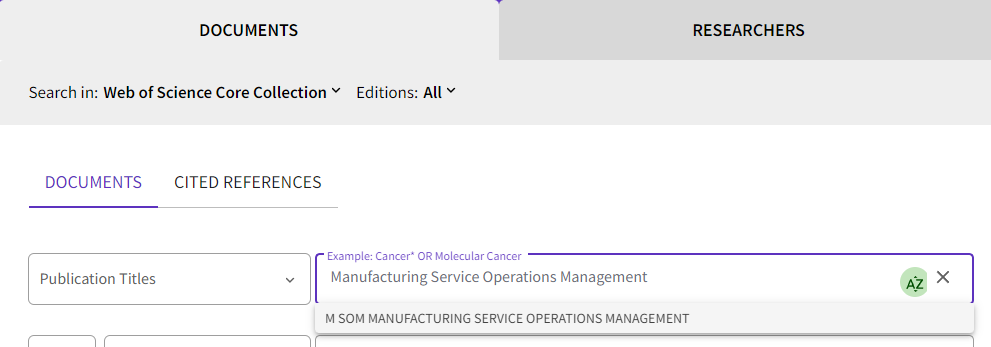
One possible problem here is if you find no matches for the title.
Does this necessarily mean that the journal isn’t included? Not really.
Instead, you would get a matching result only if you entered
“Manufacturing Service Operations Management” (notice the “and” is not
included).
You get similar problems if you copy and paste into the search box
“The Accounting Review” (it is listed under “Accounting Review”).
To confirm that you have not made a mistake, it is a good idea to
drop common words like “the”, “and”, “&” in the journal title, or browse the list of journals.
Advanced Note – Some journals go through journal title name changes across time or may merge or split with other journals,
depending on the database used, matching by name or ISSN (see example
of Scopus in next issue) may or may not include articles listed under
predecessor titles.
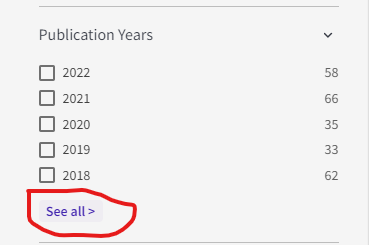
You can check coverage of years by doing a search for the journal
title only and using the “Publication Years” filter/facet (click “See
all”) to check the range of years covered (see below).
Tip #3 – For
complicated searches with many keywords and many journal titles, you may
want to use the advanced search and Search History feature to combine
searches.
So, you have checked that Web of Science includes to a reasonable
degree the journals you are targeting, is it time to recreate the full
search query in one go? Not quite.
Here’s my recommended workflow
Step 1 : Create and run a boolean search strategy matching all articles in your targeted journals.
Step 2 : Create and run a boolean search strategy matching all articles for your targeted keywords.
Step 3 : Combine the search strategy in step 1 and step 2!
This might seem overly complicated but has several advantages.
Firstly, given that the search query can be long, it is helpful for
troubleshooting to be able to work and verify separately which parts of
the search are working properly or not working properly.
Secondly, it is likely that you may want to reuse the part of the
search that matches your targeted journals (for example with other
keywords). As such it is more efficient to create and verify that part
of the search works separately first which you can then combine with
other searches later.
Our Business Research Librarian Redzuan has painstakingly checked
for availability of each of the 50 journals as shown above and confirmed
that they are all included in Web of Science (but see disclaimer
above).
He then started to create a combined search query for all 50 journals which is Step 1.
How do you then create a search query matching all 50 Journal titles in the Web of Science advanced search?
The logic for this isn’t particularly difficult.
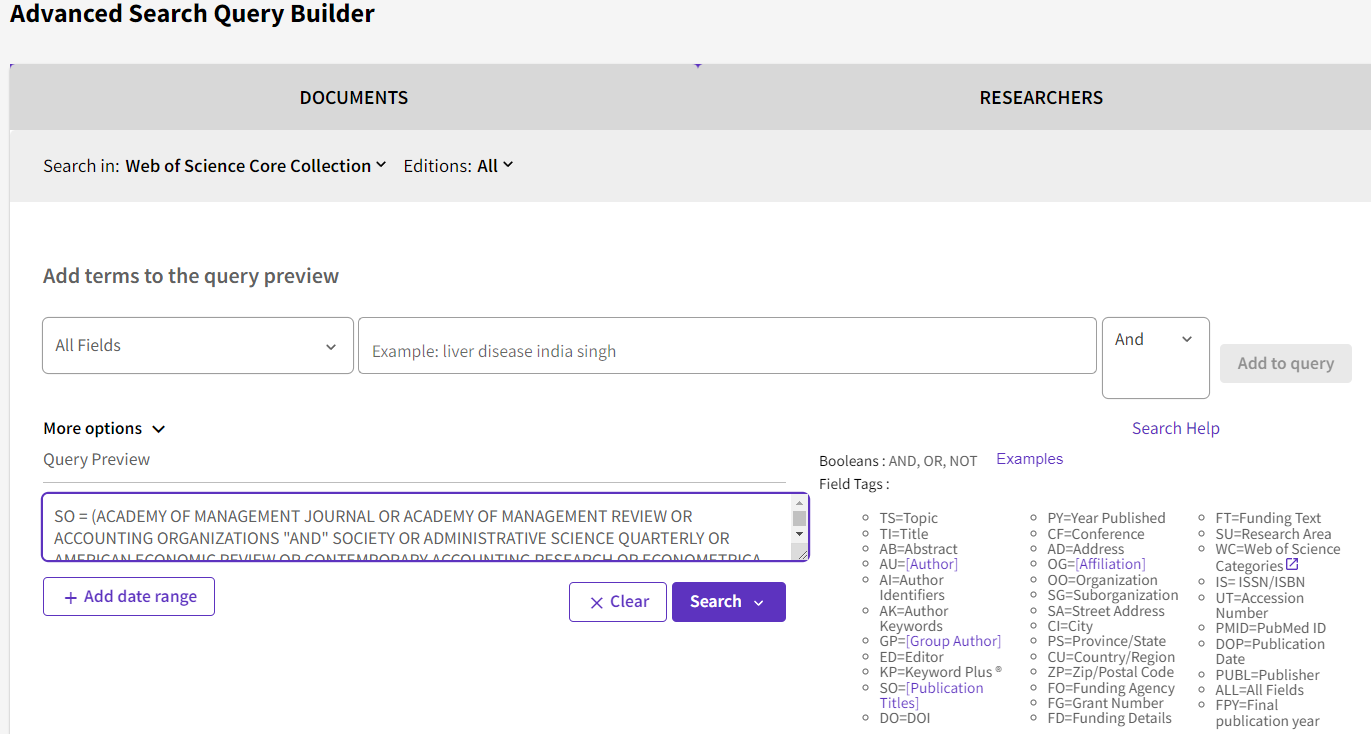
As SO stands for “Publication Title”, simply construct a search that
goes SO = Journaltitle1 AND Journaltitle2 AND... will do the trick
This is what Redzuan came up with
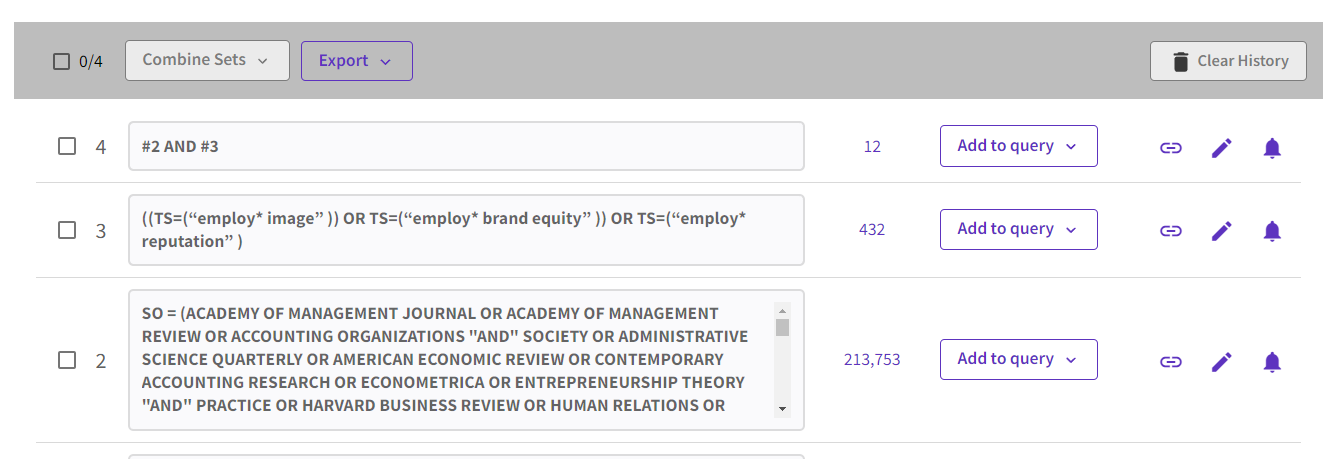
SO = (ACADEMY OF MANAGEMENT JOURNAL OR ACADEMY OF MANAGEMENT REVIEW OR ACCOUNTING ORGANIZATIONS "AND"
SOCIETY OR ADMINISTRATIVE SCIENCE QUARTERLY OR AMERICAN ECONOMIC REVIEW
OR CONTEMPORARY ACCOUNTING RESEARCH OR ECONOMETRICA OR ENTREPRENEURSHIP
THEORY "AND" PRACTICE OR HARVARD BUSINESS REVIEW OR
HUMAN RELATIONS OR HUMAN RESOURCE MANAGEMENT OR INFORMATION SYSTEMS
RESEARCH OR JOURNAL OF ACCOUNTING RESEARCH OR JOURNAL OF APPLIED
PSYCHOLOGY OR JOURNAL OF BUSINESS ETHICS OR JOURNAL OF BUSINESS
VENTURING OR JOURNAL OF CONSUMER PSYCHOLOGY OR JOURNAL OF CONSUMER
RESEARCH OR JOURNAL OF FINANCE OR JOURNAL OF FINANCIAL "AND"
QUANTITATIVE ANALYSIS OR JOURNAL OF FINANCIAL ECONOMICS OR JOURNAL OF
INTERNATIONAL BUSINESS STUDIES OR JOURNAL OF MANAGEMENT OR JOURNAL OF
MANAGEMENT INFORMATION SYSTEMS OR JOURNAL OF MANAGEMENT STUDIES OR
JOURNAL OF MARKETING OR JOURNAL OF OPERATIONS MANAGEMENT OR JOURNAL OF
POLITICAL ECONOMY OR JOURNAL OF THE ACADEMY OF MARKETING SCIENCE OR
MANAGEMENT SCIENCE OR MARKETING SCIENCE OR MIS QUARTERLY OR ORGANIZATION
SCIENCE OR ORGANIZATIONAL BEHAVIOR "AND" HUMAN DECISION PROCESSES OR PRODUCTION "AND"
OPERATIONS MANAGEMENT OR QUARTERLY JOURNAL OF ECONOMICS OR RESEARCH
POLICY OR REVIEW OF ACCOUNTING STUDIES OR REVIEW OF ECONOMIC STUDIES OR
REVIEW OF FINANCE OR REVIEW OF FINANCIAL STUDIES OR SLOAN MANAGEMENT
REVIEW OR STRATEGIC ENTREPRENEURSHIP JOURNAL OR STRATEGIC MANAGEMENT
JOURNAL OR ACCOUNTING REVIEW OR ORGANIZATION STUDIES OR OPERATIONS
RESEARCH OR JOURNAL OF MARKETING RESEARCH OR JOURNAL OF ACCOUNTING
ECONOMICS OR M SOM MANUFACTURING SERVICE OPERATIONS MANAGEMENT)
Advanced
Note – For Web of Science, when matching in the publication title field
adding double quotes around each title is not necessary but does not
hurt.
You can cut and paste the above string into Web of Science advanced
search and click search, or if you have a Web of Science account, you
can click on the following link, login with your personal account and look at the results.
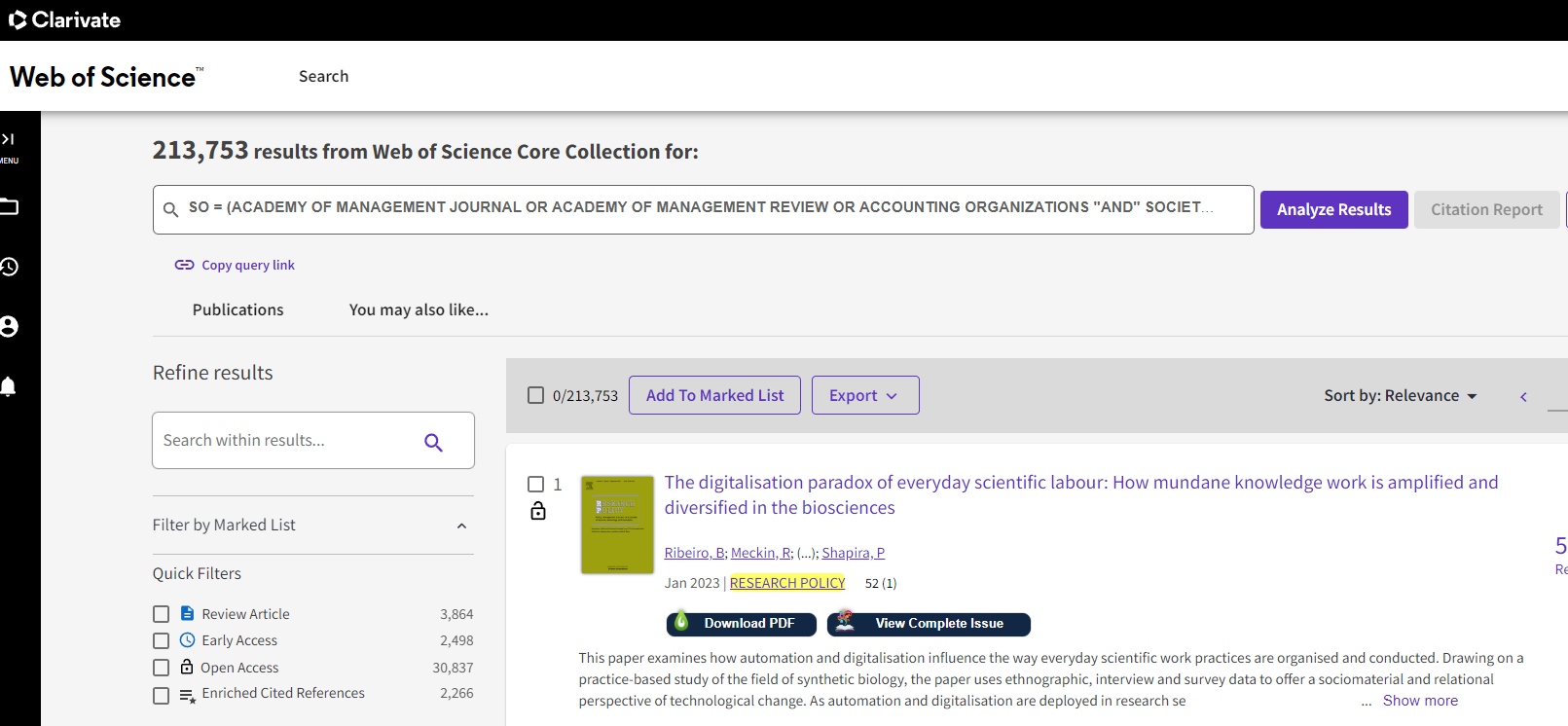
As at the time of writing, I see 213,753 matches coming from all 50 journals in the FT50.
You might want to use the different filters/facets like “Publication
Titles”, “Publication Years” to do a final spot-check to see if
everything is in order first.
Once you are satisfied this search works reasonably well, proceed to
step 2. Create and run a separate search just for your keywords
For Step 2, for illustrative purposes, we are going to match one or
more of the following three keywords (this is just an example you can
add more) using the advanced search.
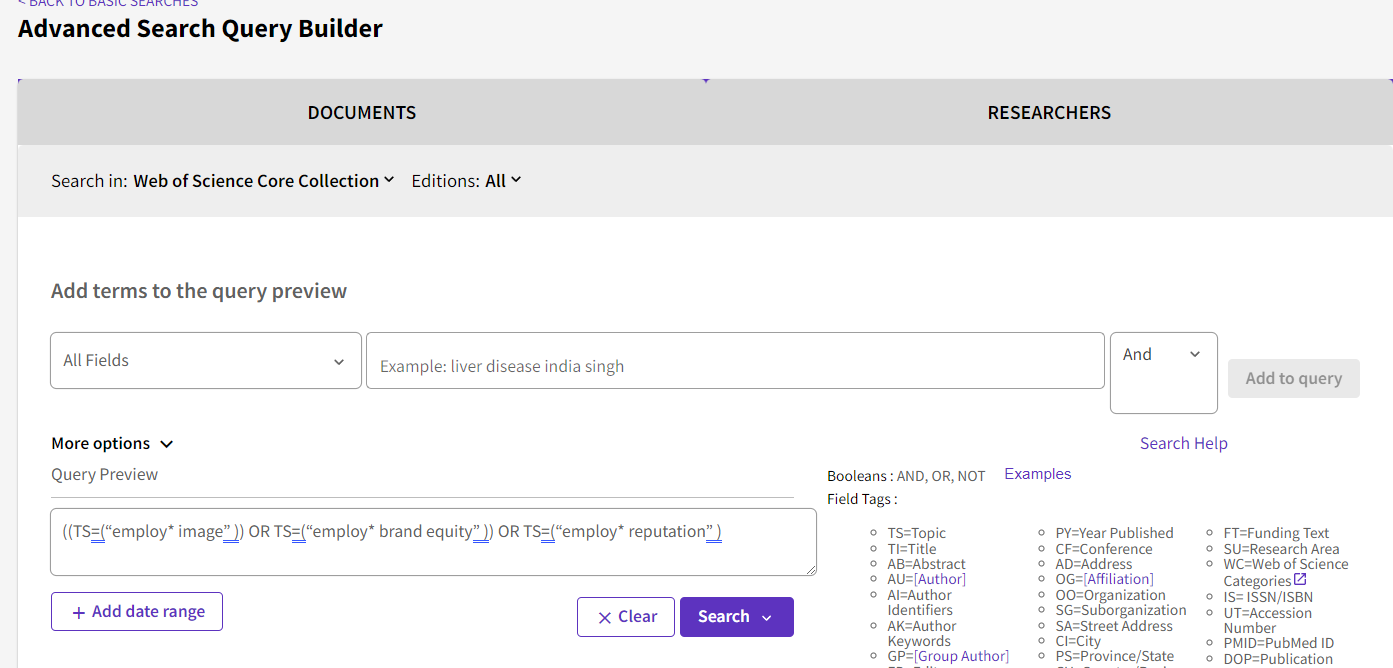
“employ* image”
“employ* brand equity”
“employ* reputation”
For this search,
we decided to match a list of keywords in the “Topic” field. We can see
this uses the field tag – TS. This will search for the keyword in the
following fields:
Title
Abstract
Author
Author Keywords
Keywords Plus
Here’s the resulting search query string
((TS=(“employ* image” )) OR TS=(“employ* brand equity” )) OR TS=(“employ* reputation” )
Step 3 or the final step is to combine the two search queries we
have tested. To do this go to Web of Science advanced search and scroll
to the bottom of the page.
Look for the two search queries we have done earlier – both the
search query covering the 50 FT journals as well as the search query
covering the keywords we are interested in.
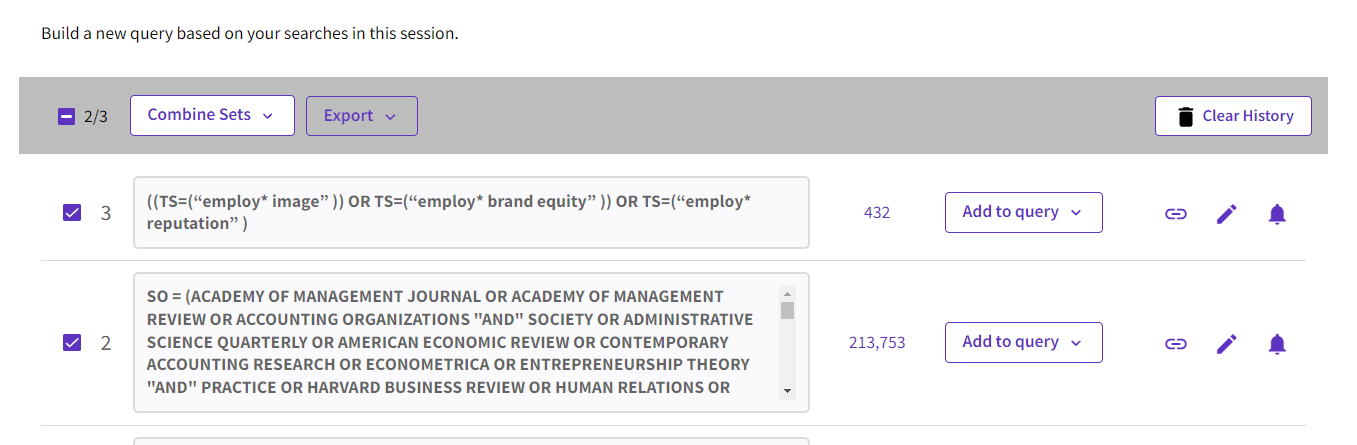
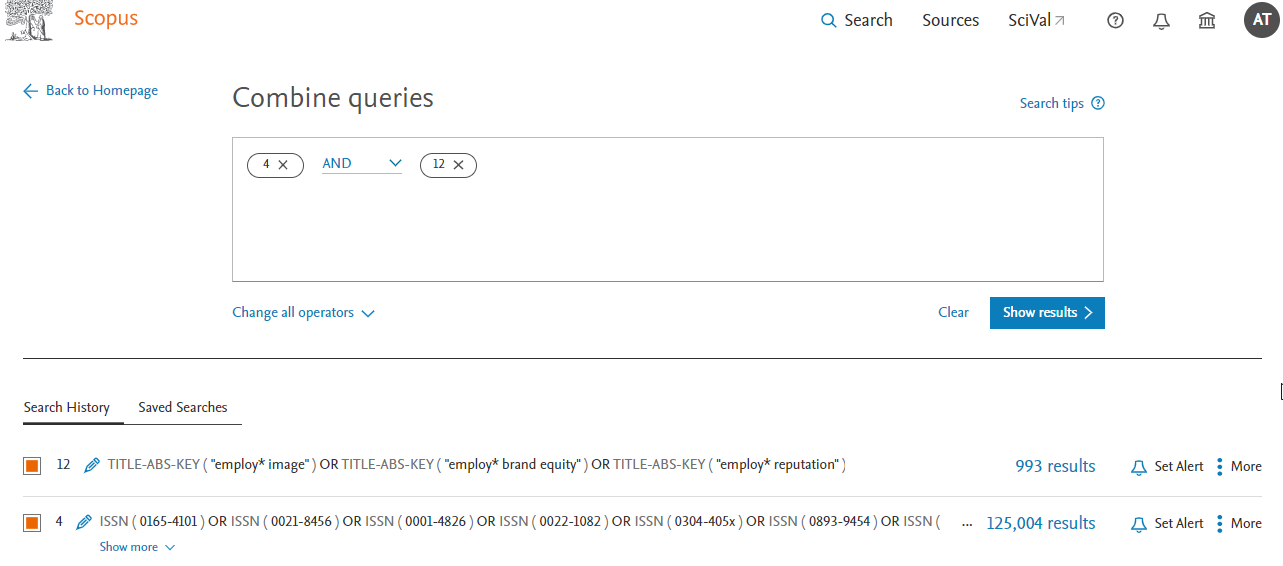
Select the two search queries, then click on “Combine Sets” and select AND in the dropdown menu. This will generate the final needed query (Click and sign in with your WOS account).
As you can see from the screenshot above at the time of writing there are 12 results.
Once you have the needed query, you can click on the “bell icon”
next to each query and create a search alert for any new results
matching the search to be emailed to you.
Also notice that because you split the search into two, you can
easily reuse Search Query #2 (which matches the journals) when needed
with other keyword searches.
Conclusion
While the logic behind creating search queries for matching journal
lists can be simple, in practice some work needs to be done to ensure
the search is accurate. Hopefully this article has helped you think
through the steps needed for working with Web of Science. We will cover
how to do the same search for Scopus next month.
Part 2: Creating search strategies in Scopus to match results from a list of selected journal titles (e.g., FT50 Journal List)
Check each journal on your list one by one to ensure they are correctly included in your database of choice
Once all the selected journals are verified, create a search
strategy with OR operators to include all results from that set of
journals
Run a separate search strategy for just your keywords
Combine the results from the second and third steps using the search history
How do these steps change when one decides not to use Web of Science and instead use Elsever’s Scopus?
About Scopus
For those not aware, Scopus is another well-known cross-disciplinary
citation index that is seen to be an alternative to Web of Science.
Between the two, Scopus generally is slightly more inclusive in the
ranges of journals included (but it is still selective) though it may
not cover some journals as far back as Web of Science.
Tip #1 – Create your own Scopus account and sign in from Scopus.com
Once you have registered your account, go directly to https://www.scopus.com
and sign in with your account. With a personal account, you can keep
track of searches you have done and reuse them when necessary. This is
very useful when you have long complicated queries or anticipate reusing
parts of such searches.
Warning – While you can run your searches with a personalized account via the normal library proxied link
this may not be a good idea for long queries (e.g. when there is a long
list of journals or keywords matched). This is because the query may
break because of excessive length. Going directly to https://www.scopus.com and signing in with your personal account without using the proxy helps avoid this issue.
Tip #2 – Check if and how much of your targeted journal is included in Scopus but use ISSN for matching
In our last example with Web of Science, we searched for each journal
in our list using the “Publication Title” field. The equivalent one in
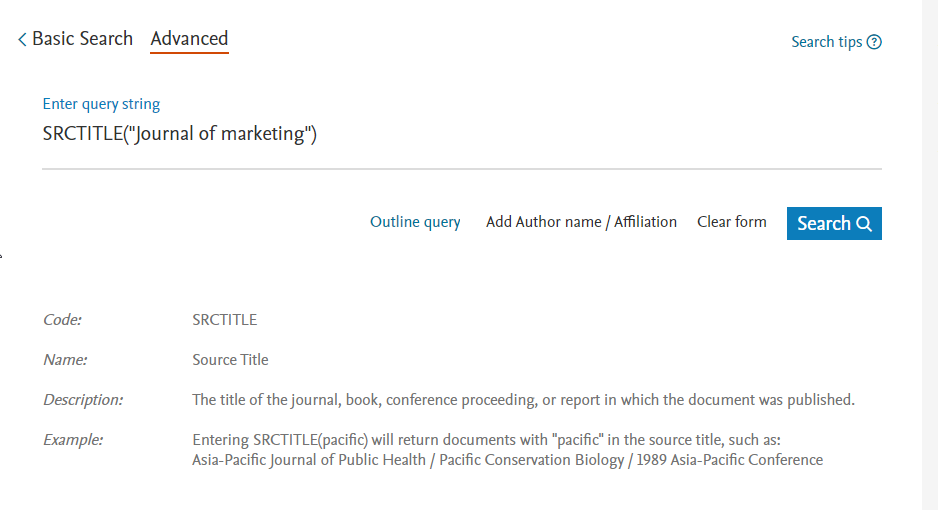
Scopus is called “Source Title” which uses the field code SRCTITLE in
the advanced search.
However, if you use this field to match journals you will run into issues.
Say you want to look for articles in the “Journal of Marketing”, you can create an advanced search by using SRCTITLE (“Journal of marketing”) in Scopus advanced search (see below)
Though the results look fine at first glance, when you use the Source
Title filter to explore the results, you will see they the search
results include a lot of journals you do not want including articles
from journals such as “European Journal Of Marketing”, “Journal Of
Marketing Education” etc.
The only way to solve the problem is to match by ISSN. In this example, in advanced search do ISSN(0022-2429) which will get you only articles from the Journal of Marketing.
Advanced Note – Some journals go through journal title name changes across time or may merge or split with other journals,
depending on the database used, matching by ISSN may or may not include
articles listed under predecessor titles. For example, searching for
ISSN(0022-3808) will match both “Econometrica” and “Econometrica Journal
Of The Econometric Society”
Note that even if a journal is included in Scopus, it does not mean
that the journal is covered from the very first issue. For Scopus, the
coverage generally starts from at least 1996 but is not guaranteed. This
may be important to be aware of for use cases involving the creation of
reviews where historical depth is required.
You can check the coverage of years by doing a search for the journal
title by ISSN and using the “Year” filter/facet to check the range of
years covered (see below).
Tip #3 – For
complicated searches with many keywords and many journal titles, you may
want to use the advanced search and Search History feature to combine
searches
So, you have checked that Scopus includes to a reasonable degree the
journals you are targeting, is it time to recreate the full search query
in one go? Not quite.
Here’s my recommended workflow
Step 1 : Create and run a boolean search strategy matching all articles in your targeted journals.
Step 2 : Create and run a boolean search strategy matching all articles for your targeted keywords
Step 3 : Combine the search strategy in step 1 and step 2!
This might seem overly complicated but has several advantages.
Firstly, given that the search query can be long, it is helpful for
troubleshooting to be able to work and verify separately which parts of
the search are working properly or not working properly.
Secondly, it is likely that you may want to reuse the part of the
search that matches your targeted journals (for example retrying search
strategies with different keywords). As such it is more efficient to
create and verify that part of the search works separately first which
you can then combine with other searches later.
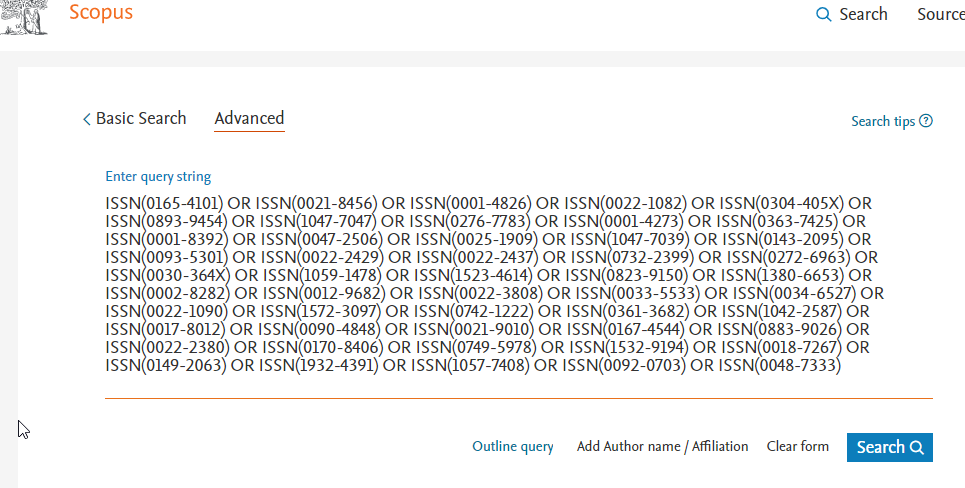
ISSN(0165-4101) OR ISSN(0021-8456) OR ISSN(0001-4826) OR
ISSN(0022-1082) OR ISSN(0304-405X) OR ISSN(0893-9454) OR ISSN(1047-7047)
OR ISSN(0276-7783) OR ISSN(0001-4273) OR ISSN(0363-7425) OR
ISSN(0001-8392) OR ISSN(0047-2506) OR ISSN(0025-1909) OR ISSN(1047-7039)
OR ISSN(0143-2095) OR ISSN(0093-5301) OR ISSN(0022-2429) OR
ISSN(0022-2437) OR ISSN(0732-2399) OR ISSN(0272-6963) OR ISSN(0030-364X)
OR ISSN(1059-1478) OR ISSN(1523-4614) OR ISSN(0823-9150) OR
ISSN(1380-6653) OR ISSN(0002-8282) OR ISSN(0012-9682) OR ISSN(0022-3808)
OR ISSN(0033-5533) OR ISSN(0034-6527) OR ISSN(0022-1090) OR
ISSN(1572-3097) OR ISSN(0742-1222) OR ISSN(0361-3682) OR ISSN(1042-2587)
OR ISSN(0017-8012) OR ISSN(0090-4848) OR ISSN(0021-9010) OR
ISSN(0167-4544) OR ISSN(0883-9026) OR ISSN(0022-2380) OR ISSN(0170-8406)
OR ISSN(0749-5978) OR ISSN(1532-9194) OR ISSN(0018-7267) OR
ISSN(0149-2063) OR ISSN(1932-4391) OR ISSN(1057-7408) OR ISSN(0092-0703)
OR ISSN(0048-7333)
Once you have this search it is important to save this search so you
can reuse it in future searches. Go to Scopus advanced search and scroll
to the bottom to the “Search history” section. Click on the save icon
on the right to save this search so you can reuse it in future searches,
For step 2- Let's once again for pure illustration purpose, do an advanced search of the query below
We are essentially do a search to match these keywords in Title, Abstract or Keyword.
The next and final step is simple. Go back to search (or advanced
search) and scroll to the search history at the bottom and select the
search queries corresponding to the last two searches (one matching the
journal list, one matching keywords). Combine the two queries together and see the result.
Look at the final resulting query and explore some results to check
if it is working as expected. Once you are satisfied you can save this
search or click on the bell icon to set an alert.
Conclusion
This is the second part of the Research Radar series covering the use
of advanced search queries to match keywords from a select list of
journals. In the last piece we covered how to do it in Web of Science, while in this one we covered Scopus. The procedure is similar except ISSN is used for matching instead of the journal title.
In the concluding piece next month, we will cover how to do this for other miscellaneous sources such as Google Scholar.
Part 3: Creating search strategies to match results from a list of
selected journal titles (e.g., FT50 Journal List) - using Google Scholar
and Lens.org
But what about other databases? Given that both Web of Science and
Scopus cover the most reputable high impact journals (which does include
all FT50 Journals) is there any reason to use other databases?
One reason to use other databases is that the journal you want to
include is not included in either of these databases so you will need a
larger, more inclusive database. Secondly, both Web of Science and
Scopus are commercial and behind paywalls so if you are no longer
affiliated with SMU or any other academic institution, you may not have
access to these databases and may have to use a free-to-use system.
While Google Scholar no doubt leaps to mind when we talk about free to-to-use search systems, I currently recommend the use of Lens.org to do this instead.
Why not Google Scholar?
Google Scholar is a popular free-to-use academic search engine by
researchers and one of the largest sources of academic content, so it
seems natural to consider using it.
However, Google Scholar has several known major drawbacks.
Firstly, the length of the search query is limited to 256 characters,
and this is far less than in Scopus or Web of Science, which means you
will be unable to do a search that covers a long list of journals in one
go.
Another known limitation of Google Scholar is if your search matches
more than 1,000 results, you are at best able to see 1,000 results even
if the results count shows otherwise.
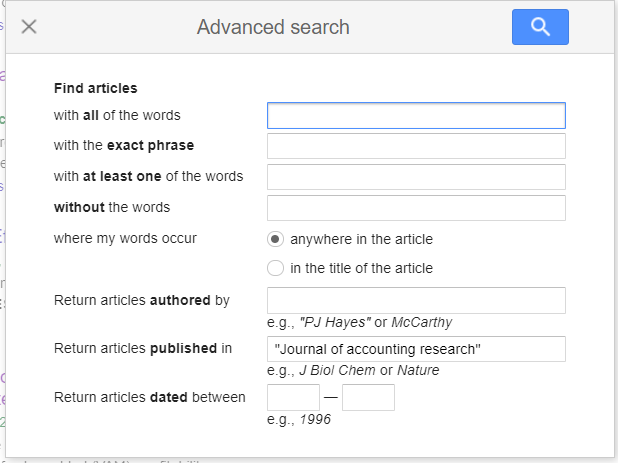
Most seriously, while the advanced search allows you to do a “Return
articles published in” search (see below) or equivalently a source: <insert journal title> search this often result in false hits.
For example, source:"journal of accounting research"
in Google Scholar may still get you results from “China Journal of
Accounting Research” or “international journal of accounting research”
and there is no way to match results by ISSN specifically.
The trick is that while there is no explicit ISSN field in Google
Scholar to match unlike for Scopus or Web of Science, you can search for
ISSN in the full text of Google Scholar, but if you use that alone you
may get false drops from papers which just happen to have the ISSN in
full-text for some reason.
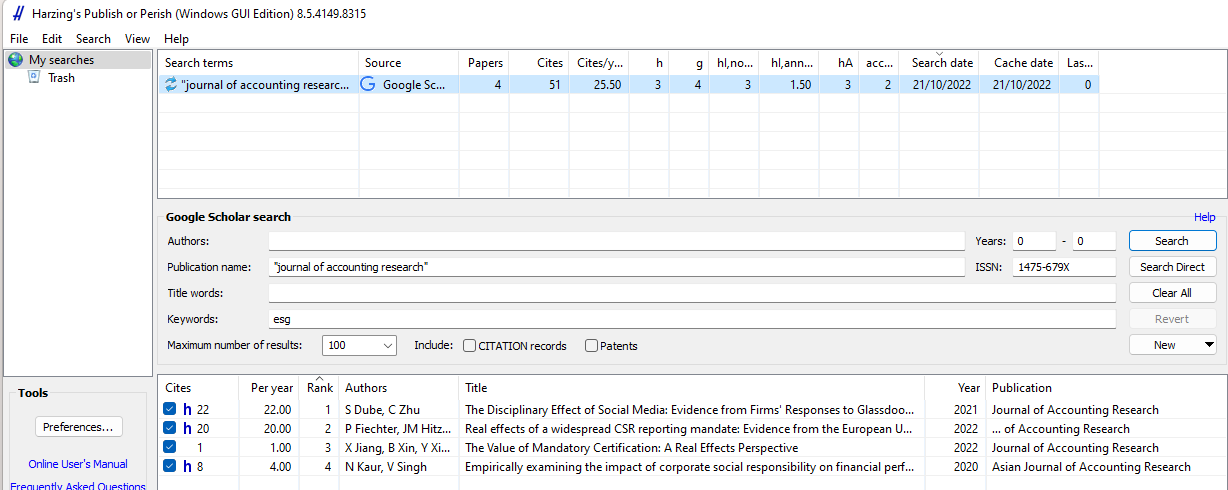
This still won’t allow you to get past the 1,000 results limits but
using Harzing’s software makes it easier to do such queries in batches.
Why Lens.org
Lens.org is a free scholarly
search system by Cambia, an independent non-profit social enterprise.
The original Lens.org was known for allowing patent searches but in 2018
Lens.org started including what it calls the Scholarly Works Search
feature. This search covers over 250 million academic records (journal
articles, book chapters, conference proceedings, theses and more)
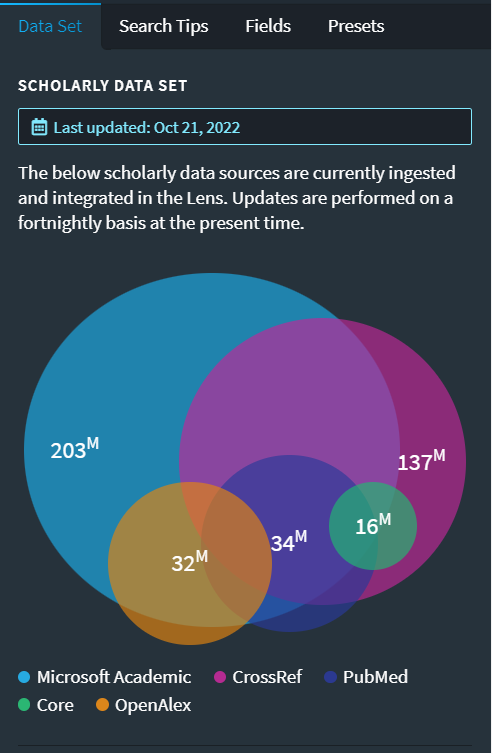
aggregated from various open sources including Crossref, Microsoft Academic Graph, OpenAlex, PubMed, CORE
and more. While it is not as big as Google Scholar, it is one of the
largest sources and unlike Web of Science or Scopus which is selective
on what journals are included, Lens.org takes an inclusive approach to
what is included.
This means that if you are interested in a particular journal not
indexed in Scopus or Web of Science, chances are you will find it here.
More importantly, unlike Google Scholar, Lens.org
provides a very robust and powerful search system that is comparable to
what you get in commercial databases like Scopus and Web of Science and
this makes it suitable for the search we are doing here that requires
precise searching.
Recommended steps for Lens.org
We have already gone through the steps on what to do for Scopus and Web of Science, and the steps remain the same for Lens.org
Check each journal on your list one by one to ensure they are correctly included in Lens.org
Once all the selected journals are verified, create a search
strategy with OR operators to include all results from that set of
journals
Run a separate search strategy for just your keywords
Combine the results from the second and third steps using the search history or saved query
Like Web of Science and Scopus, I highly recommend you register for a
free Lens.org account and login before you start doing the search.
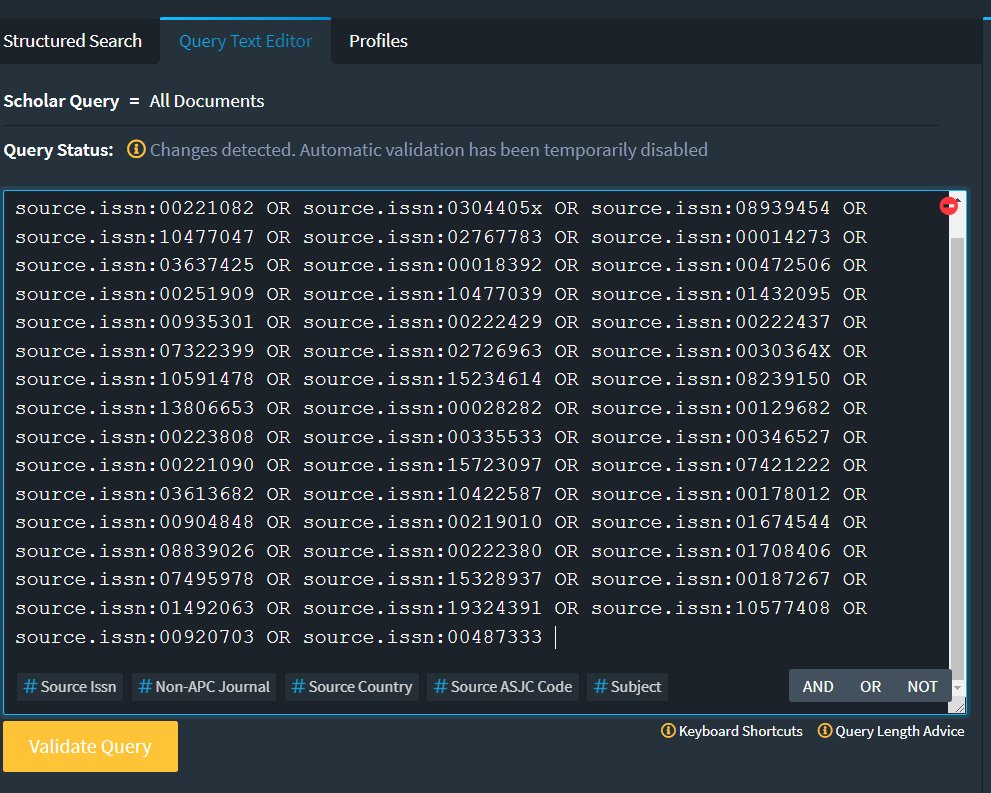
For Lens.org, this is the search strategy I came up with that works in Lens.org for FT50 journals:
source.issn:01654101 OR source.issn:00218456 OR source.issn:00014826
OR source.issn:00221082 OR source.issn:0304405x OR source.issn:08939454
OR source.issn:10477047 OR source.issn:02767783 OR source.issn:00014273
OR source.issn:03637425 OR source.issn:00018392 OR source.issn:00472506
OR source.issn:00251909 OR source.issn:10477039 OR source.issn:01432095
OR source.issn:00935301 OR source.issn:00222429 OR source.issn:00222437
OR source.issn:07322399 OR source.issn:02726963 OR source.issn:0030364X
OR source.issn:10591478 OR source.issn:15234614 OR source.issn:08239150
OR source.issn:13806653 OR source.issn:00028282 OR source.issn:00129682
OR source.issn:00223808 OR source.issn:00335533 OR source.issn:00346527
OR source.issn:00221090 OR source.issn:15723097 OR source.issn:07421222
OR source.issn:03613682 OR source.issn:10422587 OR source.issn:00178012
OR source.issn:00904848 OR source.issn:00219010 OR source.issn:01674544
OR source.issn:08839026 OR source.issn:00222380 OR source.issn:01708406
OR source.issn:07495978 OR source.issn:15328937 OR source.issn:00187267
OR source.issn:01492063 OR source.issn:19324391 OR source.issn:10577408
OR source.issn:00920703 OR source.issn:00487333
In Lens.org, choose the structured search for Scholarly works and
change to the “Query Text Editor” tab and paste the query from above
into the box.
Once you have validated the query (click on “Validate Query”), you can submit the query and check if it is working as expected.
Note:
Note: While checking the FT50 list by testing with individual ISSNs , I
notice Lens.org would occasionally pick up small numbers of articles in
unfamiliar journal titles. While some of it may be a result of prior
journal name changes others look like a problem with the metadata
cleanliness.
The rest of the steps should be straight forward; do another search
with the keywords you want and then merge them with the results from the
above set of results. In fact, you might also want to save the query or
even the results as a collection so you can revisit the results.
Note:
Note: As at time of writing, Lens.org's merge and intersect
functionality is broken due to a bug, however this should be fixed by
Dec 5, 2022
Conclusion
This is the third and final part of a series of creating advanced
search strategies that match articles only in certain journals. We have
covered both Scopus, Web of Science and now Google Scholar and Lens.org.
The same logic can be applied for practically any other database with
the appropriate coverage and functionality.
Editor’s note: Today’s post is co-authored by Lisa
Janicke Hinchliffe, TSK Chef, and Kalyn Nowlan, an MS/LIS candidate at
the iSchool at University of Illinois Urbana-Champaign who also works at
Funk Library, which supports research for the college of Agricultural,
Consumer and Environmental Sciences. When Kalyn graduates in May, she is
interested in pursuing academic librarianship, with a focus on
scholarly communications and supporting student success.
Publishing platforms typically use
certain indicators, such as standardized text or symbols, to indicate
whether articles in hybrid journals are open access. This communicates
to users whether they can access the articles without a subscription or
paying a per-article fee. These indicators are important to the
publishers and the authors; communicating what type of access a user has
to an article may influence the article’s reach. Librarians also rely
on these indicators to properly assist those who are using these
publishing platforms. Yet, in spite of these indicators, we have noted
that users are often confused about whether they have access to an open
access article. Something about the signaling is not communicating as
intended.
Over the past months, we have
conducted a pilot investigation into the signals used on a sample of
platforms. Our analysis revealed that this aspect of the user
interface is not standardized across the industry nor are symbols and
text phrases always used predictably within a given platform. Industry
initiatives such as Seamless Access and GetFTR have attended to
questions related to consistent user experience with authorization and
indicators for access for subscribed content. In today’s post, we bring
attention to the uneven user experience with signals indicating open
access content.
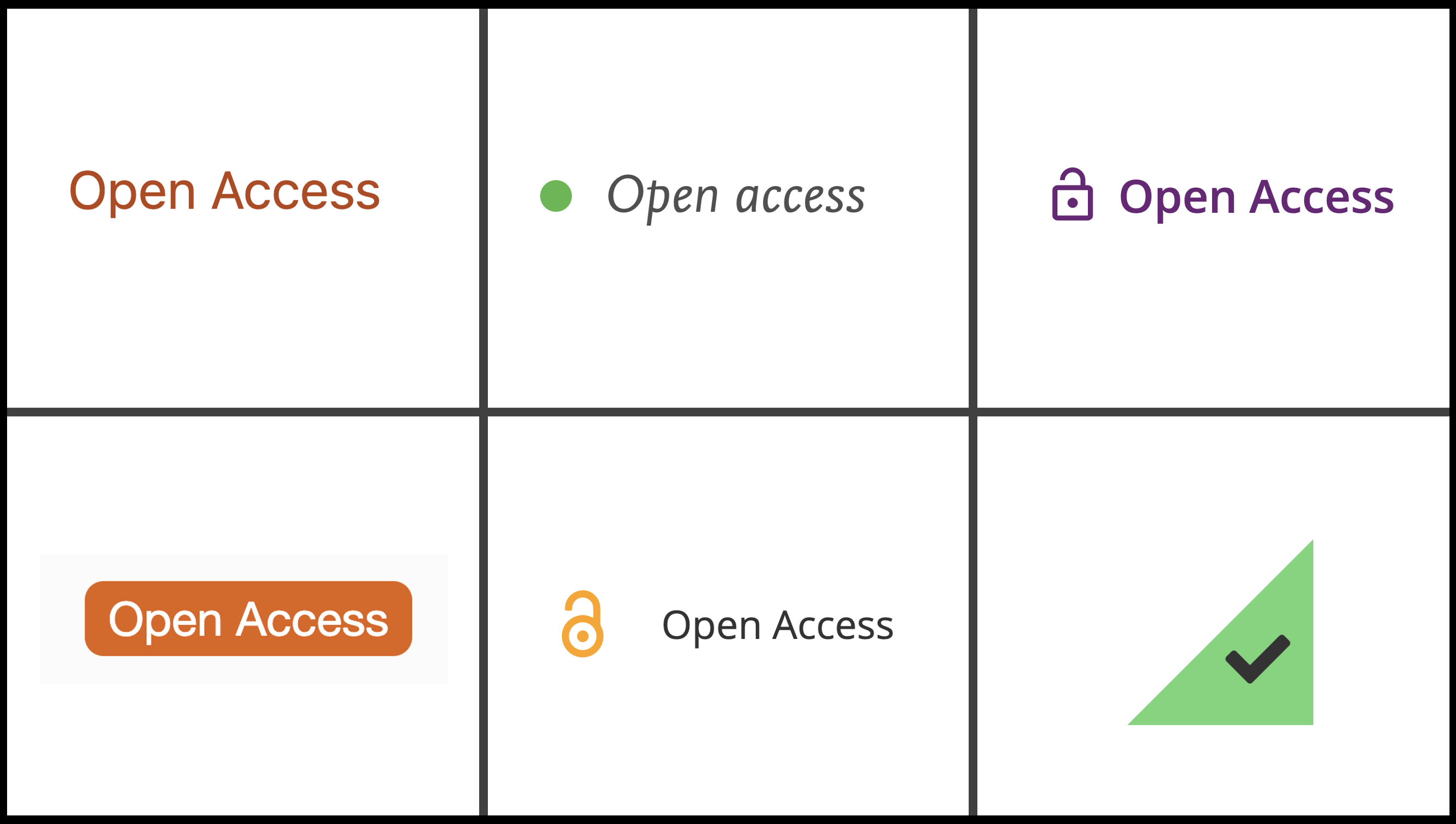
Collage of open access indicators from the five platforms.
In designing our inquiry, we were
guided by two research questions: (1) how do publishing platforms
indicate which articles are open access, and (2) is there consistency in
the indicators used within and across scholarly publisher platforms? We
believe this multi-platform analysis is particularly important as most
users must navigate multiple sites during their research journey and so
the user experience is not in the control of any single publisher. We
selected five major publishers for our analysis: Elsevier, Springer,
Wiley, Sage, and Taylor & Francis. As some of the largest academic
publishers, their platforms are likely to be used, at least at some
point, by the typical faculty member or college student user.
Methodology
To determine how
open access is indicated in the table of contents display, we selected
one journal from each publisher. After downloading a current journal
list for each publisher, we selected the first hybrid journal listed
that was actively publishing in 2020 and located the first issue of that
year that contained both open access and paywalled articles. We chose
the early 2020 timeframe to ensure that any delayed open access papers
(e.g., to comply with U.S. public access requirements) would be open. We
went to the table of contents for the issue and noted how open access
is indicated for the listed articles.
To determine how open access is
indicated in search results, we conducted a keyword search on each
platform. We used the term “pandas” as an example search term, which
brought up articles from multiple journals in multiple disciplines as
the term can refer to an animal, it is also a term used in software
programming and pediatric medicine, and it is used as slang. We then
looked for open access indicators in the results, browsing through
multiple screens if necessary in order to locate an open access article
among those displayed.
We organized our data in a
spreadsheet by scholarly publisher (Elsevier, Sage, Springer, Taylor
& Francis, and Wiley), and documented the results for each type of
search (table of contents or keyword), the open access indicators in
use, and, to differentiate as well between open, free, and subscription
access, recorded whether a paywall or other indicators were used. We
also captured screenshots or saved as a PDF each displayed screen used
in analysis.
We collected pilot data in May and
June 2022 in order to develop our methodology. We revisited the
platforms in September and October 2022 to collect the data used in this
analysis after noting that some publishers had updated their interfaces
since the original data collection.
What We Found
Reviewing the table of contents and
keyword search results, we saw that, for the most part, these publishing
platforms had internally consistent open access indicators. The
indicators used were consistent regardless of whether we were viewing a
table of contents or the results of a keyword search. However,
indicators varied greatly across publishing platforms, with different
terminology, colors, and symbols in use. We also found that open and
paywalled access were not the only kinds of access that were indicated;
some platforms provided third or even fourth options. These additional
types were indicated with various phrases such as “full text access,”
“free access,” or “available access” and with very little explanation
about what differentiated these kinds of access from open access.
In the table of contents, Elsevier’s
indicator is a green dot with text reading “Open Access.” The green dot
indicator is used in the keyword search. The same green dot indicator
also appears with the label “Full Text Access.” Whenever the green dot
appears, so did a PDF icon and the text “Download PDF.”
In the table of contents, Sage’s
indicator is an orange unlocked icon with the text “Open Access” and a
PDF/EPUB download icon. The same indicators are used in the keyword
search results display. Another type of access is indicated by a green
unlocked icon with text that says “Free Access” and the PDF/EPUB
download icon. Sage also overtly labels non-open/non-free articles with
the label “Restricted Access” and a black locked icon.
In the table of contents, Springer’s
indicator is orange text that says “Open Access.” In the keyword search,
Springer uses an orange box with white text that says “Open Access.”
Thus, Springer is consistent in use of color – always using an orange
and white combination – but not consistent in which is background and
which is text color.
Taylor & Francis displays each
item in a table of contents or search results set in a box that offsets
it from the page background. Indicators for access are in the lower
right corner of an item box. For open access articles, Taylor &
Francis uses an orange triangle with an unlocked icon in both tables of
contents and keyword search displays. The term “Open Access” appears
next to the triangle as a mouse-over. A green triangle with a checkmark
in it also appears in the displays and the text “Free Access” shows upon
mouse-over.
In the table of contents, Wiley’s
indicator is purple text that says, “Open Access” and an unlocked icon.
The same indicator is used in the keyword search. Another kind of access
is indicated by blue text that says “Free Access” accompanied by an
unlocked blue icon. We observed that Wiley does use the unlocked green
icon seen on other platforms. However, Wiley does so accompanied by the
label “Full Access” and this is when the user has subscription-based
access to content.
All of this was quite challenging to
investigate and document. It involved hours of searching, capturing
screen, clearing caches, incognito browsers, deleting one’s data from
SeamlessAccess, and being vigilant to GetFTR powered links in order to
reconcile our interpretations. As such, though we have sought to be
accurate in our portrayals here, we share our findings with our
acknowledged limitations. We welcome corrections to any errors in our
interpretations in the comments to this piece. And, we would also
suggest that such errors be seen as further evidence of just how
confusing the signals and indicators are.
Implications
The data collected provide evidence
of internal consistency of open access indicators on a single platform
and overall cross-platform inconsistency. A publishing platform was
deemed internally consistent if it has the same open access indicators
on the table of contents and keyword search results. A platform was
deemed internally inconsistent if the open access indicators are
different in the table of contents and keyword search results. The only
platform that did not have complete internal consistency was Springer,
which used the same text and colors but inverts orange/white for text
and background.
Elsevier, Sage, Wiley, and Taylor
& Francis all had internal consistency; however, the symbols that
they used to indicate open access differed significantly from one
another. There were some similarities, such as the locked/unlocked
imagery and download icons in Sage, Taylor & Francis, and Wiley, but
the difference in colors and shapes were notable. When users are
navigating through multiple platforms during their research process, not
having universal symbolism for open access has the potential to slow
them down and create confusion.
Another confusion is an absence of
information to help a user distinguish among
open/free/full/available/etc. access. Sometimes it is not clear whether
the user has “free access” or “full access” to an article because they
are affiliated with an institution with a subscription or because the
article is open for reading for everyone. And, open access is indeed a
kindof free access, but the inconsistency in terminology is likely to cause confusion.
With Sage, whether a user has logged
into the platform through their institution will impact the indicators
that they see; if they are at a subscribing institution, a new label –
“Available Access” – appears accompanied by the green unlocked icon.
This means that collaborating scholars who are accessing the platform in
different ways – unauthenticated or authenticated/unentitled vs
authenticated/entitled – will see different indicators for the same
article. Elsevier’s green dot may also confuse. While the green dot
consistently indicates that the user has access, the green dot is
associated with both “open access” and “free access” terminology as well
as the “full-text access” that reflects a subscription-based
entitlement.
Though the open access indicators in
use within a given publishing platform are relatively consistent, this
investigation documents that there is significant inconsistency across
the platforms. Publishers use different colors, symbols, and terminology
to indicate open access. They also use a variety of symbols and text to
indicate other kinds of access that are free but also – one infers –in
some way different from open access. Encountering such a wide array of
symbols and terminology seems likely to create confusion about whether
users can access certain articles and why. This is also a burden for
expert users, such as librarians, who are navigating different platforms
as they have to orient themselves repeatedly to different sets of
indicators.
Those of us in the library and
publishing fields may understand the differences among terms like “open
access,” “full text access,” “available access” and “free access” (or at
least can usefully hypothesize about them); but, those outside of our
professions likely will not. Efforts to better explain access indicators
on a given platform would decrease user confusion. But, even better
would be a shared taxonomy of indicators and texts implemented across
the industry to improve the user experience.
Lisa Janicke
Hinchliffe is Professor/Coordinator for Research and Teaching
Professional Development in the University Library and affiliate faculty
in the School of Information Sciences and Center for Global Studies at
the University of Illinois at Urbana-Champaign. lisahinchliffe.com
Kalyn Nowlan is
an MS/LIS candidate at the iSchool at University of Illinois
Urbana-Champaign who works at the Funk Library, which supports research
for the college of Agricultural, Consumer and Environmental Sciences.
When Kalyn graduates in May, she is interested in pursuing academic
librarianship, with a focus on scholarly communications and supporting
student success.
Save & analyze your invaluable trove of data before it is gone forever.
With
all of the uncertainty around Twitter's future, many are considering
leaving the platform. But before blindly jumping into the unknown, users
should seriously consider downloading and saving their Twitter data to
analyze it for important trends, insights and information that they can
take with them.
We created the free dataviz tool below to illustrate how data visualization can help better inform users before they decide to delete their Twitter accounts and abandon years of useful data. Without dataviz, these insights are nearly impossible for anyone to decipher from a data file alone.
Any Twitter user (person or business) can follow these easy steps:
Wait approximately 24 hours to receive your data from Twitter as a zip file.
Load the tweets.js file from the data folder in the downloaded archive using the 'Choose File' button below.
Scroll down and start investigating important trends!
Important:Your private data will not be uploaded to the internet, it is processed privately in your browser.
The visualizations below show @enjalot's
data to give you a sense of the visualizations available. By choosing
your tweets.js file all of the tables and visualizations below will be
updated to reflect your information!
10,587 tweets since Aug 28, 2008
This first table will show all tweets over the lifetime of an account
- they are all searchable using existing metadata. Simply type a topic
into the search bar below and every tweet that referenced that term will
show up.