Source: Ale Ebrahim, Nader (2023): Maximizing Your Research Visibility and Impact, Researcher Branding. figshare. Presentation. https://doi.org/10.6084/m9.figshare.22139825.v1
Source: Ale Ebrahim, Nader (2023): Maximizing Your Research Visibility and Impact, Researcher Branding. figshare. Presentation. https://doi.org/10.6084/m9.figshare.22139825.v1
Source: https://ditchthattextbook.com/ai-tools
Artificial intelligence is growing by leaps and bounds. It's no longer science fiction anymore!
Lots of AI tools can serve as our own personal assistants -- answering questions, helping us write text, create images, speak more effectively, and more.
Time has always been a barrier in the classroom. Most teachers would agree that they would be able to do more -- including the things that are most important -- if they had more time.
Teachers can find AI tools that are ready to help them out right now. Lots of them are free or have "freemium" plans with limited free options.
Below is a description of AI and how you can start using it to support your work in class.
Artificial intelligence (AI) refers to the ability of a computer or machine to perform tasks that would normally require human intelligence, such as learning, problem-solving, decision-making, and more. There are several different approaches to building AI systems, including machine learning, where a system is trained on a dataset and can improve its performance over time, and rule-based systems, where the system follows a set of predetermined rules to make decisions.
AI can be applied to a wide range of areas, including natural language processing, image and video recognition, robotics, and more. The goal of AI research is to create systems that can perform tasks at least as well as, or ideally better than, humans. AI has the potential to revolutionize many industries and transform the way we live and work, but it also raises important ethical and social questions.
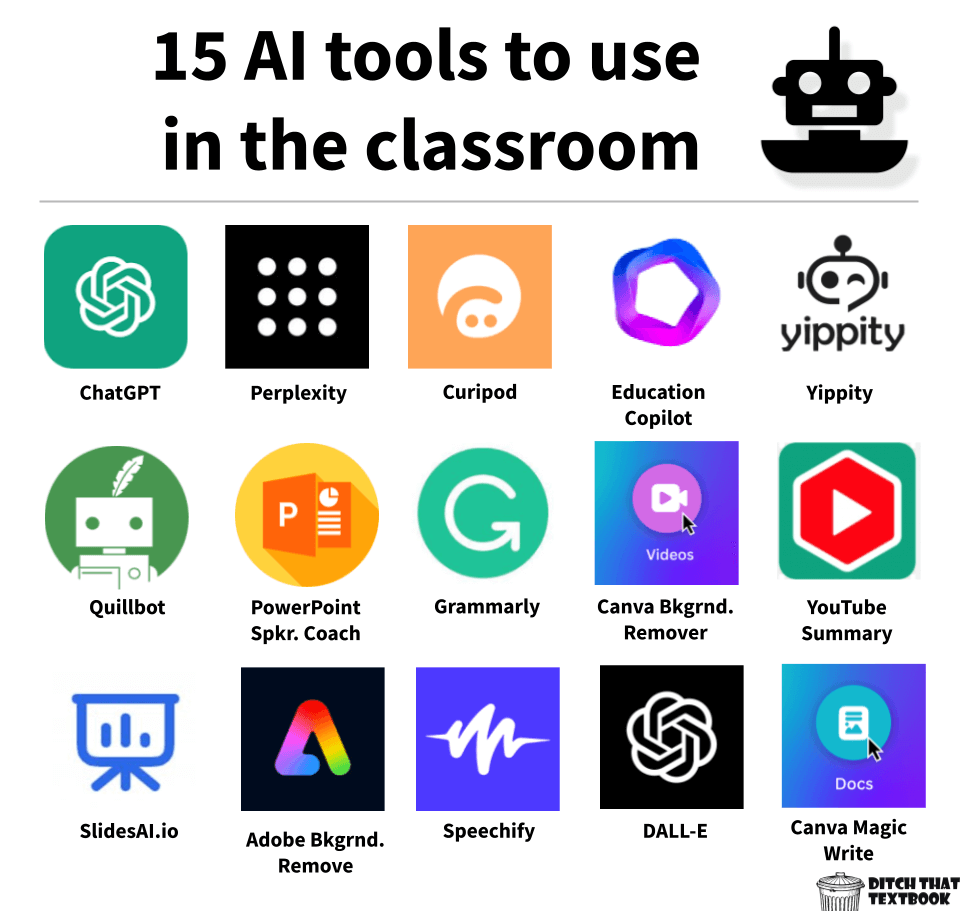

ChatGPT is a generative AI chatbot that interacts with you conversationally, the way a human would. It's trained with information from all over the internet and tons of other sources -- and it's been trained by humans to interact with you in an authentic way.
How it works: Ask ChatGPT a question or give it a request. It will respond. There are lots of ways you can use it in the classroom, as detailed in this post: ChatGPT, Chatbots, and Artificial Intelligence in the Classroom.
Pricing and terms: It's a "freemium" tool, meaning there's a free plan and a paid premium plan.
You can give it unlimited queries with the free version.
ChatGPT
Plus ($20/month) gives general access to ChatGPT, even during peak
times. It provides faster response times. Plus, it gives priority access
to new features and improvements.
Check it out: chat.openai.com

Perplexity is another generative AI chatbot that lets users ask questions and get responses conversationally. What seems to set Perplexity apart is that it cites sources, which are easily clickable to get more context and more information.
How it works: Go to Perplexity and ask it a question or request something. You'll see the concise version at first, but you can click to see a detailed response. It will also list the sources where it drew its information and other related topics. You can ask follow up questions, in a conversational manner like ChatGPT.
Pricing and terms: Perplexity is free.
Check it out: perplexity.ai

Give Curipod (curipod.com/ai) a topic, and it will generate an interactive slide deck for you in seconds, including:
How it works: Once you have a slide deck (which seems to generate 9-12 slides on your topic), you can edit and adjust to suit your needs. Plus, you can add more slides on your own.
Pricing and terms: It's a "freemium" tool, meaning there's a free plan and a paid premium plan.
With
the free plan, you can have up to five private Curipod decks. (But it
looks like you can delete old ones and create new ones.)
Otherwise, it's $15/month for teachers. There are school and district licenses available.
Check it out: curipod.com/ai

Need a starting point for your lesson plans? Education Copilot provides you with AI generated templates for lesson plans, writing prompts, educational handouts, student reports, project outlines and lots more.
It has 10+ tools to help save time and create content for the classroom.
How it works: Open Copilot and choose one of its teachers tools, including informational handouts, lesson plans, and more. Add some details on the content you want to cover. Then generate a product. If it isn't exactly what you want, adjust the information you inputted to create something else.
Pricing and terms: 30 day free trial. After that, it's $9 per month.
Check it out: Go to the Education Copilot website for information and to sign up.

Yippity will convert any text or any website into a quiz automatically.
It creates questions and answers based on the text submitted, which can be copied and pasted into a flashcard app or quiz tool.
How it works: Copy/paste text from your notes (limited to 10,000 characters) -- or copy/paste the URL to a webpage. Submit, and it generates questions and answers. Then, use the share button to share the quiz with someone else.
Pricing and terms: Create three free AI quizzes per month. Unlimited AI question generation is available on the "Early Bird Plan," which is $2.99/mo.
Check it out: Get information and sign up at yippity.io.

Quillbot will help you paraphrase or re-write text. Analyze lots of synonyms to find just the right word.
Use it to help your fluency, vocabulary, tone, and style.
How it works: Paste some text into its Paraphraser and ask it to rephrase the text. It will offer lots of options for reworking it.
Pricing and terms: It's a "freemium" tool, meaning there's a free plan and a paid premium plan.
The free version offers 125 words in the Paraphraser and 1200 words in the Summarizer plus other limited options on the other features.
Premium is $19.95USD a month or $99.95USD a year and you get unlimited words in the Paraphraser and 6000 words in the Summarizer plus more options on the other features.
Check it out: Go to quillbot.com/

From the Microsoft website:
Speaker coach helps you prepare in private to give more effective presentations.
Speaker coach evaluates your pacing, pitch, your use of filler words, informal speech, euphemisms, and culturally sensitive terms, and it detects when you're being overly wordy or are simply reading the text on a slide.
After each rehearsal, you get a report that includes statistics and suggestions for improvements.
How it works:
Pricing and terms: Speaker coach is currently available to everyone in free preview—even without a Microsoft Office subscription.
Check it out: Microsoft PowerPoint Speaker Coach

Grammarly is your online writing assistant. Using artificial intelligence, it helps you compose bold, clear, mistake-free writing. It can work inside your email client, your productivity suites, and even your social media. Grammarly’s AI checks grammar, spelling, style, tone, and more.
How it works: Type directly into the Grammarly editor, paste writing from another document or use the Grammarly add-on available for many sites and apps.
Pricing and terms: It's a "freemium" tool, meaning there's a free plan and a paid premium plan.
The free plan checks for grammar, spelling, punctuation, conciseness and tone detection.
The premium plan costs $12.00 USD/month and includes everything in the free plan plus full-sentence rewrites, word choice, tone suggestions and citations
Check it out: Grammarly.com
Canva’s video background remover allows you to remove the background of any video with just the click of a button.
No green screen? No problem! With this tool you can transport yourself, or your students, anywhere in or out of this world.
How it works: Canva's video background remover is a premium feature that all educators have access to through their FREE Canva EDU Pro account.
To use the feature simply upload a video to Canva. Click "edit video" then under "effects" click "background remover".
Pricing and terms: Get your free Canva EDU Pro account by getting verified at canva.com/education.
Check it out: Canva Video: background remover, new animations, and more

From the Glasp.co website:
YouTube Summary with ChatGPT is a free Chrome Extension that lets you quickly access the summary of the YouTube videos you are watching with OpenAI's ChatGPT AI technology. Use this extension to save time and learn quicker.
How it works: Install the Chrome or Safari extension and open any YouTube video. Click on the transcript & summary then on the ChatGPT icon to view the AI summary.
Pricing and terms: Free
Check it out: Glasp.co/youtube-summary

SlidesAI.io is an add-on for Google Slides with the ability to work with PowerPoint coming soon.
With SlidesAI.io you can take any piece of text and transform it magically into visually appealing slides.
How it works: Enter the text that you want to create your presentation from. Customize the look of the presentation. Then watch the magic!
Pricing and terms: It's a "freemium" tool, meaning there's a free plan and a paid premium plan.
Check it out: slidesai.io

Remove image background with Adobe Express.
Artificial intelligence works with images, too! Inside Adobe Express, you’ll find lots of “quick actions” … little things you might do in other apps, but they’re all handy in Express. Remove image background is one of those.
How it works: Pull in an image and download a version of it with a transparent background. Use other quick actions like GIF and MP4 converters, video trim and resize, and more.
Pricing and terms: Free and easy to use without a log in.
Check it out: Express.adobe.com/tools/remove-background
Convert text in a doc, PDF, webpage, or book to speech with Speechify.
Beyond its accessibility, it lets you consume content 2 to 3 times faster than reading. Plus, you can “read” by listening on the go.
How it works: Speechify is a text-to-speech tool. It will let you turn text into natural sounding voice in Google Chrome, Apple devices, and Android devices.
Pricing and terms: The free version gives you text to speech features only in 10 standard reading voices.
The premium version ($139USD/year) gives you text to speech plus scanning and listening and highlighting and note taking tools in 30+ voices and 20+ different languages.
Check it out: Speechify.com
From their website:
DALL·E 2 is a new AI system that can create realistic images and art from a description in natural language.
DALL·E 2 has learned the relationship between images and the text used to describe them. It uses a process called “diffusion,” which starts with a pattern of random dots and gradually alters that pattern towards an image when it recognizes specific aspects of that image.
How it works: Type in whatever you want to see and even how you want it represented for example pixel, cartoon, or in the style of Claude Monet. Then DALL-E will create an image based on your description.
Pricing and terms: Free
Check it out: Openai.com/dall-e-2
Tell Magic Write what you're thinking about. It will compose your ideas into something usable. It can even rewrite your existing text into a new version -- and help you brainstorm new ideas.
Visit Introducing Magic Write in Canva Docs to learn more.
How it works: Just tell it what’s on your mind and it’ll create a starting point for you. It’ll also create a new version of your existing text. It helps you brainstorm new ideas, drafts for emails, and more. It’ll even adjust your writing to the tone you choose.
Pricing and terms: Canva Free users have 25 lifetime uses of Magic Write. Canva Pro, Canva for Teams, or Canva for Nonprofit gets 75 uses per user per month.
Check it out: It's part of Canva Docs, Canva's word processor inside Canva's new productivity suite.
This text generated by ChatGPT based on https://papers.ssrn.com/sol3/papers.cfm?abstract_id=2457669

Ethical and Unethical Methods of Plagiarism Prevention in Academic Writing
Plagiarism is a major issue in academic writing and can lead to severe consequences for both students and scholars. It not only undermines academic integrity but also compromises the credibility of research. In order to address this issue, researchers have proposed various solutions to detect and prevent plagiarism. However, not all of these methods are ethical. In this blog post, we will discuss the ethical and unethical methods of plagiarism prevention in academic writing.
Ethical methods of plagiarism prevention:
Paraphrasing: Paraphrasing involves rephrasing an original text in your own words while retaining its original meaning. This is a useful technique to avoid plagiarism as it shows that you have understood the original text and are able to express its ideas in your own words.
Citation: Proper citation is a critical element of academic writing. Whenever you use someone else’s ideas, you should provide a citation to the original source. This not only avoids plagiarism but also gives credit to the original author.
Quotation: Using quotations is another way to avoid plagiarism. When you use direct quotes, you should use quotation marks and provide a citation to the original source.
Summarizing: Summarizing involves providing an overview of the main ideas of a text in your own words. This technique is useful when you need to include information from a large text without copying it.
Collaboration: Collaboration with others can help to prevent plagiarism. By working with others, you can discuss ideas and develop original content that is not plagiarized.
Unethical methods of plagiarism prevention:
Using online plagiarism detection software to paraphrase: Some unethical authors use online paraphrasing tools to change the wording of an original text without understanding its meaning. This technique does not show an understanding of the original text and can lead to unintentional plagiarism.
Buying papers: Some students and scholars buy papers from online services. This is not only unethical but also illegal. It is a form of academic cheating that can lead to severe consequences.
Copying from others: Copying from others without proper citation is a form of plagiarism. This technique is not only unethical but also illegal.
Self-plagiarism: Self-plagiarism is the act of reusing your own work without proper citation. This technique is not ethical as it does not give credit to the original work.
Falsifying information: Falsifying information is the act of providing false information in order to avoid plagiarism. This technique is not ethical as it compromises the integrity of research.
In conclusion, there are various ethical and unethical methods of plagiarism prevention in academic writing. Ethical methods include paraphrasing, citation, quotation, summarizing, and collaboration. Unethical methods include using online plagiarism detection software to paraphrase, buying papers, copying from others, self-plagiarism, and falsifying information. It is important for scholars and students to use ethical methods to prevent plagiarism and maintain academic integrity.
Source: https://www.sciencegate.app/b/how-to-evaluate-the-impact-of-research-works/
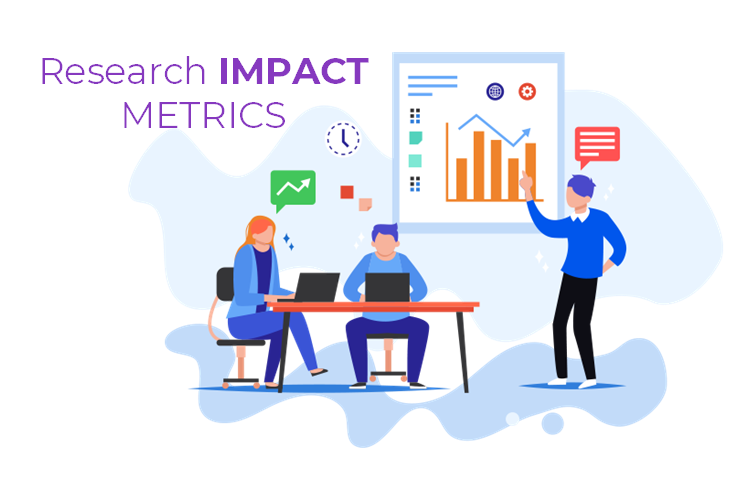
An important question that may arise for researchers is how to evaluate the impact of their research papers. Basically, bibliometric studies are used as a tool for evaluating the impact of scientific publications. A very popular field of study for measuring the research impact is called Scientometrics. There are various metrics and methods utilized for measuring the research bibliometric impact of scientific authors, some of which are mentioned below.
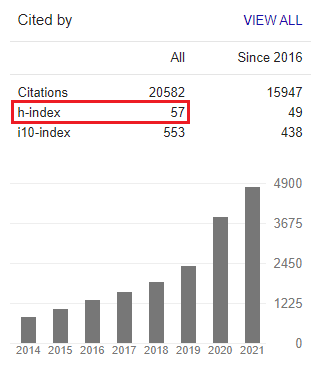
This metric, which is widely used for evaluating the publication impact of researchers, indicates the total number of citations received by publications of a researcher.
The number of citations received by published documents of a researcher divided by the total number of published documents. In fact, citations/document is the number of publication citations of a researcher normalized by his/her publications volume. This index can be calculated and evaluated in different time periods (e.g. the last 5 years, the last 2 years, etc.) indicating the impact of the papers over time.
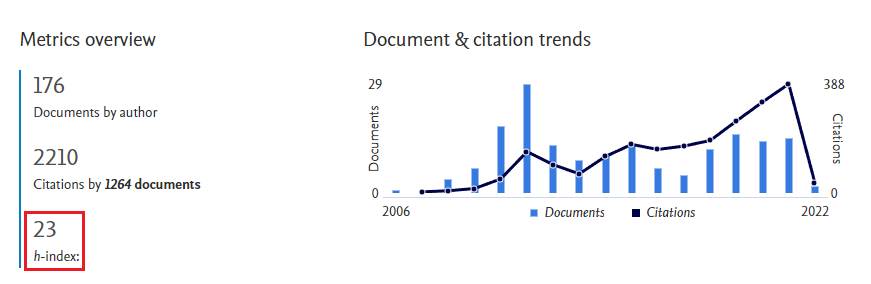
This metric indicates the number of papers published by a researcher, h, that have been cited at least h times. H-index, introduced by J.E. Hirsch in 2005 [1], is one of the most widely used author-level metrics that quantifies an author publication impact by considering the citation and volume of research works. You can find an author’s h-index in Google Scholar, Web of Science, and Scopus. It is to b noted that the h-index should not be utilized as an indicator for comparing the rank of researchers who are in different disciplines.
This indicator is found by simply normalizing the h-index of an author by the average h-index of all authors in a specific field of study. The normalized h-index allows the comparison of researchers working within different disciplines. The normalized h-index, unlike the h-index, can be regarded as a universal scholarly impact metric.
This metric is the normalized h-index by publication years of an author. The m-index is calculated by dividing the h-index of a scholar by the number of years since the first published document of that scholar.
This index shows the number of publications of an author with at least 10 citations. The I-10 index was introduced first by Google in 2011, and it is still used as an author-level metric in Google Scholar.
The G-index is the first g papers of an author (sorted by highest to lowest number of citations) that have received cumulatively at least g*g citations [4]. unlike the h-index, the g-index is unequivocally influenced by highly-cited published papers. This scholarly impact metric was first introduced in 2006.
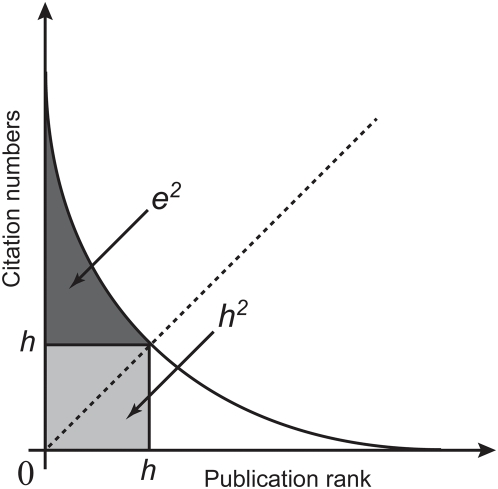
Not all citations of an author publication are taken into account when calculating the h-index. In fact, the citations that exceed the h-core are totally ignored (look at the following graph). The e-index is introduced to complement the h-index for ignored citations [5]. This metric is suitable for comparing the performance of authors’ publications with the same h-index.
Author Impact Factor (AIF) indicates the mean number of citations received by publications of an author in a year.
RG score which stans for ResearchGate score is an author-level metric proposed by ResearchGate in 2012 [1]. A lot of factors including the scientific and social activities of researchers affect their RG score. One can increase his/her RG score by sharing research work with other RG colleagues, asking and answering questions, uploading new search items, creating projects, attracting more followers, etc.
Field-weighted Citation Impact (FWCI) is another author performance metric introduced by SciVal [3]. FWCI is a discipline-normalized indicator which means it takes disciplinary differences into account and so can be used as an indicator for comparing the rank of researchers who are in different fields of study and disciplines.
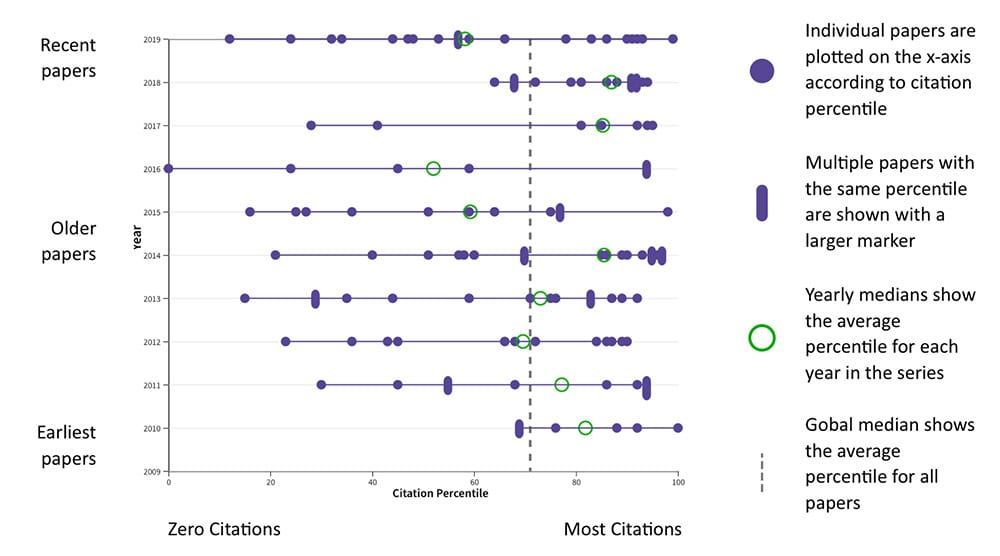
Beamplot is not a metric but a method indicating citation and volume impact of a researcher’s publication over time (the figure below) [2].
[1] https://thenextweb.com/news/researchgate-introduces-rg-score-like-klout-boffins
[2]
Hirsch JE. An index to quantify an individual’s scientific research
output. Proc Natl Acad Sci U S A. 2005 November 15; 102(46):
16569–16572.
[3] https://libguides.usc.edu.au/researchmetrics/researchmetrics-field-weighted-citation-impact
[4] Egghe, Leo (2006). “Theory and practise of the g-index”. Scientometrics. 69 (1): 131–152.
[5]
Zhang, Chun-Ting (2009). Joly, Etienne (ed.). “The e-Index,
Complementing the h-Index for Excess Citations”. PLOS ONE. 4 (5): e5429.
Source: https://www.sciencegate.app/b/maximize-the-visibility-and-impact-of-your-research/
Why looking for higher visibility for your paper?
Universities ranking approaches assign a high share for the number of citations that university researchers’ publications receive. The table below indicates the share of the index associated with papers citations for some of the most famous university ranking approaches.
| UNIVERSITY RANKING METHODOLOGY | Weight of the index associated with papers citations |
 | 30% |
 | 40% |
 | 20% |
 | 20% |
DON’T FORGET THAT YOUR PAPER QUALITY COMES FIRST.
Here are the steps that you should highly pay attention to, before publishing your article in order to get maximum impact and visibility.
Discover and find emerging topics for publication in your research area and take distance from declining topics.
Trending topics represent research areas with significant growth acceleration in recently published articles. Here are some online tools that can help you discover emerging topics in your research areas. You may refer to another of our posts for more information in this field.
Select English as your paper language or at least provide your paper abstract in English.
Although English is not the native language of the majority of researchers, it is still the dominant language of the scientific community.
Find the most suited and relevant journal for your manuscript.
Here are some useful tools by which you can find journals that could be best suited for publishing your scientific paper. Review the journal’s aims & scopes before deciding where to submit your paper.
 Journal Finder |
 Journal Suggester |
 Journal Suggester |
 Journal Finder |
Prioritize Open Access journals for your publication.
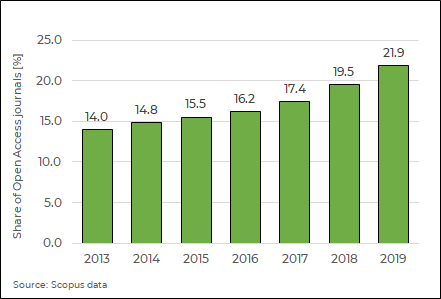
Open access journals tend to be cited more in comparison with non-open access ones. Publishing papers in open-access journals may boost up the citation count by up to 10% [1]. Obviously, a paper which is available on the Web can be read and indexed by the Web-based search engines so it will potentially obtain more readers and receive more citations.

Scopus data indicates a growing trend for the ratio of existing Open Access journals to total journals.
Select journals with a higher impact, prestige, and disciplinary reputation (top-level journals).
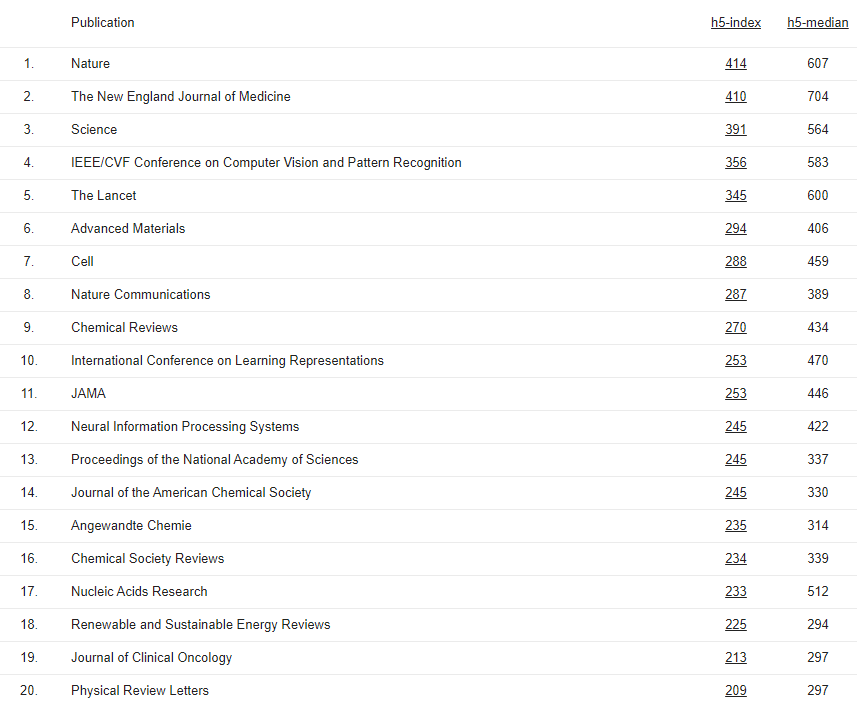
Journal metrics help you to provide insight into journals quality and impact. Here is a list including the most famous journal metrics used for journal rankings:
DON’T FORGET THAT YOUR PAPER QUALITY COMES FIRST.
Choose the most appropriate type of article according to its content and pay attention to the citations in your research work
Notice that review papers mainly get more citations than other types of papers Refer to reliable resources with high citations.
Don’t forget that, referring to the sources with higher rank will give your paper more value and higher rank. Try to cite your own and your co-authors’ previous research documents in an appropriate manner.
More than 50% of traffic to publisher websites comes from Google, Google Scholar, and other search engines. Over 60000 Google searches are performed every second. Therefore, it is very important to take steps to help your paper rank higher on Google, Google Scholar, and other search engines. Search Engine Optimization (SEO) is a set of actions so search engines like Google show your paper at a higher ranking (pages) when someone searches for something related to your paper content. SEO has a general meaning and mostly applies to web pages. This article here is focused on Academic Search Engine Optimization (ASEO) which particularly deals with the optimization of scholarly documents for search engines. Most academic search engines do not index the full text of a document (like what Google Books does) but instead index only the title and abstract. So, ASEO mostly deals with techniques that mostly focus on the article’s title and abstract.
In a search for the term “search engine optimization” a document entitled “Search engine optimization” would be ranked higher than the other one entitled “The role of search engine optimization in search marketing”.
It is to be noted that the citation counts of a document also play a major role in the ranking algorithm of Google Scholar.
Select the most important keywords that are relevant to your paper topic and use them in the right place. The most important places for the keywords are the title and abstract of your paper. Mention the keywords and their synonyms in the title and abstract of your paper frequently (but not as much as to irritate the readers). Note that search engines normally tend to dislike the repetition of keywords known as keyword stuffing.
Although you should use keywords that are consistent with your paper topics, try to select leading and trending keywords. Refer to the major papers similar to your paper topic and check the applied keywords and also take a look at popular keywords on Google Trends and the Google Adwords keywords tool.
Use your keywords throughout your article and let them flow naturally and contextually. Try to use the main keywords in headings, subheadings, and the captions of figures and tables.
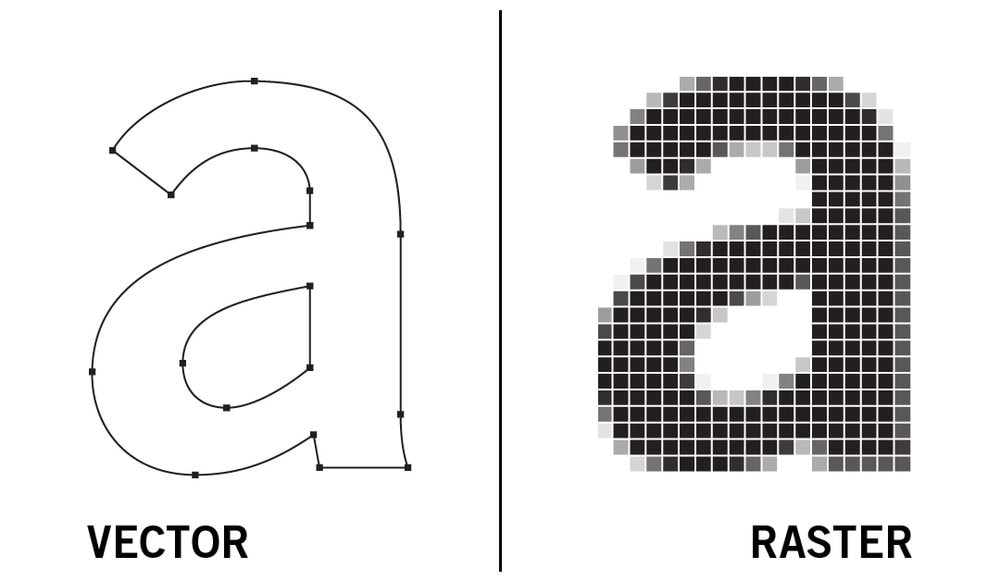
Use vector graphics instead of raster graphics for the images and tables of your paper so that the containing text can be machine-readable.
Select a descriptive and search-engine-friendly title for your paper
Use main and essential keywords in your paper title. The Search engines such as Google Scholar give the most weight to the search terms used in the title than other parts of the paper.
A short paper title is more attractive to search engines than a long one
As stated in the literature, papers with shorter titles receive more citations than papers with longer titles (the following figure) [2].
Although short titles are more attractive for most search engines, the longer title of papers covers more topics and keywords so it may give the chance to attract more audience. Therefore, it is necessary to make a conscious compromise in this regard.

Write an informative and standard abstract for your paper
Don’t forget that the paper abstract is the shop window attracting readers to your paper. Normally the first two sentences of a paper abstract are displayed in search engine results so make sure to include main phrases and essential keywords at the beginning part of your abstract. Repeat your main keywords and phrases 3–4 times throughout your paper abstract [3].
Create your own unique identifier as an author and choose a consistent format for your name and institutional affiliation
Create and use your unique identifier as an author in order to differentiate and distinguish your publications from that of all other researchers. You can freely get your ORCID identifier at https://orcid.org. Use a consistent format for your name and use it with your papers.
MAKE SURE YOU FOLLOW ALL GUIDES OF THIS ARTICLE TO GIVE YOUR RESEARCH WORKS THE BEST CHANCE OF BEING DISCOVERED.
References:
[1] McCabe, Mark J., and Christopher M. Snyder. “Does online availability increase citations? Theory and evidence from a panel of economics and business journals.” Review of Economics and Statistics 97.1 (2015): 144-165.
[2] Letchford, A., Moat, H. S., & Preis, T. The advantage of short paper titles. Royal Society Open Science, 2(8), (2015): 150266.
[3] https://www.wiley.com/legacy/wileyblackwell/pdf/SEOforAuthorsLINKSrev.pdf
How useful was this post?
Click on a star to rate it!