Sunday, 21 August 2016

Increase Usage & Citation Using Social Media

 Source: https://uk.sagepub.com/en-gb/asi/increase-usage-citation-using-social-media


Increase Usage & Citation Using Social Media


As
readers' expectations change, it is important that your article is
visible where the user starts their search. Below are some of the social
media sites that SAGE recommends for promoting your article and other
channels that will offer a direct way to reach your readership.

1. Contribute to Wikipedia

We recognize that many students are increasingly using Wikipedia as
the starting pointfor their research. If there are pages that relate to
themes, subjects or research that your article covers, add your article
as a reference, with a link to it on SAGE Journals Online. If there
isn't a page in existence, why not create one. If your journal already
has a page, use these wikipedia editing guidelines to help you with
editing it. If there isn’t a page in existence, why not create one? You
can find out how here: http://en.wikipedia.org/wiki/Wikipedia:Your_first_ article.


2. Join Twitter

Authors are increasingly promoting their content via twitter which is
then picked up by other researchers and practitioners depending on
their search parameters. Look at the example here.
Senders can restrict delivery to those in their circle of friends or,
by default, allow open access. Twitter allows you to set up search terms
to enable you to monitor what is being talked about in your areas of
interest: You can then comment on the relevant conversations. The more
you engage, the more people will follow you to listen to your comments
and recommendations. As followers come to you, rather than you
approaching them, Twitter is an ideal way to reach new audiences.


Read SAGE's guidelines for how to use Twitter.


3. Add content to YouTube

Content is, of course, no longer as narrow as text and figures. It
also includes user-generated content and multi-media content such as
podcasts and videos. We are seeing an increasing amount of traffic to
our journal sites via YouTube as students use video as an initial way of
researching a topic. If you already have video content relating to your
specific journal article, please let us know and we will add it to our SAGE YouTube channel.


4. Start blogging

Wondering what to write about? How about:


  1. Your area of research and papers that you have published – and/or
    other related papers in your field of research. Don't forget to link to
    them from your blog!
  2. Conferences and training events that you're due to speak at.
  3. Your last conference – were there any interesting questions that came up?
  4. What do you think of any recent press coverage of your subject area?
  5. Ask your colleagues and co-researchers to guest blog and stimulate debate.
The more you write, the higher your page will appear in search engine
results pages when researchers are searching for content – especially
as they are increasingly using Google Scholar. SAGE will provide a
blogging template and guidelines – please contact us if you would like
further information.


5. Join academic social networking sites

Academics, researchers and practitioners are increasingly using
social communities as a way of meeting and conversing with people who
share the same research interests. These sites offer an immediate way to
monitor what other people are looking at in your field of research or
as a way to commission papers around online conversations you think are
interesting. If there aren't any groups talking about your research
interests – set one up. Take a look at ResearchGate and Academia for example. There are others too, perhaps you can ask your colleagues which they are part of to decide what suits you best.


6. Create your own website

Do you have your own website? If not, create one! You can create a
very clean and simple site using Google sites. SAGE will provide
guidelines on how to engage with your audience using social media
functionality.


7. Utilize social bookmarking with CiteULike

CiteULike is a free service to help you to store, organize and share
the scholarly papers you are reading. When you see a paper on the web
that interests you, you can click one button and have it added to your
personal library.CiteULike automatically extracts the citation details,
so there's no need to type them in yourself. It all works from within
your web browser so there's no need to install any software. Because
your library is stored on the server, you can access it from any
computer with an Internet connection.


8. Join Methodspace

Sponsored by SAGE, Methodspace
is an online community for research methods. On the site, you can
connect with other researchers, discuss methodology issues and
controversies, Discover and review new resources, find relevant
conferences and events, and share and solve methodology problems.


9. Join LinkedIn

LinkedIn is an interconnected
network of experienced professionals from around the world with over 55
million members. It is not just for career opportunities. When you
create your profile that summarizes your professional expertise and
accomplishments, why not include a mention of your articles?


10. Join Facebook

Facebook lets users add
friends and send them messages, and update their personal profiles to
notify friends about themselves. Additionally, users can join networks
organized by city, workplace, and school or college. You can also join
and create groups according to your interests or areas of expertise.


11. Register on Kudos
For more information on Kudos visit Maximise your article impact with Kudos.


While social media is increasing in importance, there are other
options to draw attention to your latest work: email your networks or
post on listservs and websites about your recent publication, and add
your article to your course reading list (if appropriate).


Increase Usage

How to Contribute to Wikipedia: 8 Steps (with Pictures)

 Source: http://www.wikihow.com/Contribute-to-Wikipedia

How to Contribute to Wikipedia

Wikipedia is a free encyclopedia project, written collaboratively by
volunteers. Many people view Wikipedia articles every day, but don't
contribute. This how-to will show you what you can do to constructively
edit Wikipedia.


Steps


  1. Image titled Contribute to Wikipedia Step 1
    1
    Create a Wikipedia account
    - Account creation is not required; however, if you register for an
    account, you will be given more privileges than a non-registered user.
    For all of these privileges to take place, your account must be at least four days old and have at least ten edits.


  2. Image titled Contribute to Wikipedia Step 2
    2
    Expand stubs. An article that is not complete, or
    written in full detail, may be marked with a {{Stub}} tag. You can help
    by adding content to the articles currently marked as stubs. Articles
    may also have a more detailed {{stub}} meaning that the stub has been
    sub-sorted. Sub-sorted stubs include anything from Arts, Cultures,
    Design, Broadcast Media, Radio, Television, Literature, and more!


  3. Image titled Contribute to Wikipedia Step 3
    3
    Add a Photo - An encyclopedia is not complete without pictures.
    You can upload as many pictures as you wish; however, you must provide
    detailed information on the source and the license of the file. If you
    cannot provide that information, do not upload any photos. If you still
    choose to upload photos, they will be deleted.


  4. Image titled Contribute to Wikipedia Step 4
    4
    Write a New Article - Wikipedia is rapidly growing, although the growth has slowed down since 2008.
    The English version of Wikipedia currently has over 5,168,000 articles!
    You can help continue this growth by writing an article of your own.
    You should write an article about something you are very knowledgeable
    about, so that you can write a complete and informative article.
    Articles created as test pages, pure vandalism, attack pages, etc. will
    be deleted on the spot, without any further debate.


  5. Image titled Contribute to Wikipedia Step 5
    5
    Remove Spam - Wikipedia is accessed by millions of people every day, thus, there tends to be a lot of vandalism or spamming.
    People who vandalize or spam a page may have added inappropriate links,
    blanked the page, added nonsense, etc. You can help out by removing, or
    reverting, this vandalism. Removing vandalism will make Wikipedia a
    better place for people to gather information and resources.


  6. Image titled Contribute to Wikipedia Step 6
    6
    Helping Out - Even though Wikipedia is an encyclopedia, it is also a community. You can help out newcomers to make it a bigger and better community for the encyclopedia.


  7. Image titled Contribute to Wikipedia Step 7
    7
    Doing Maintenance - You can help Wikipedia run optimally
    by doing maintenance tasks like removing copyright violations, fixing up
    articles, participating in deletion processes, and all sorts of other
    things.


  8. Image titled Contribute to Wikipedia Step 8
    8
    Revert vandalism - using tools if you like. If you're
    getting good at it you'll get a tool called 'rollback' that lets you
    revert vandalism faster. Remember, spam is also vandalism! If somebody
    is persistent about vandalising a page, report them to the
    'Administrator Intervention against Vandalism' board - AIV for short -
    once they have been warned suitably.


Community Q&A


Ask a Question

Video


Eager to add your expertise to an article on Wikipedia,
the free, online encyclopedia that's one of the world's most visited
websites? Follow these helpful hints to edit your first article.

Tips

  • It takes less than a minute to create an account, and you receive
    some benefits for account creation, including the ability to move pages.
    There is no confirmation email process, and the account creation is
    immediate.
  • If you have a problem with something or someone, discuss it. Always
    remember to be calm and reasonable, and you'll tend to have a better
    time in disputes.
  • Remember, in order for your account to edit semi-protected articles, it must have at least 10 edits and be four days old.
  • You can ask questions of more experienced users by putting a {{helpme}} template on your talk page.
  • If you want to practice editing Wikipedia, you can use the sandbox.
  • If you enjoy editing on Wikipedia, you might enjoy editing on wikiHow as well.
  • You can ask questions regarding editing Wikipedia on Teahouse or Wikipedia Help Desk


Warnings

  • Do not vandalize Wikipedia. It just makes a headache for everyone
    when people vandalize Wikipedia, and your edits will not be appreciated.
    The vandalism must be reverted by someone who could be editing
    Wikipedia constructively in other ways. Vandalism is usually removed
    within five minutes, or even within seconds for popular pages.
    Persistent vandalism could be met with a block by an administrator. If
    you feel the urge to vandalize with what you consider funny edits,
    consider editing on Uncyclopedia instead, where your funny edits would
    be appreciated.
  • Do not use multiple accounts to vandalize Wikipedia. Wikipedia's CheckUser can detect abusive multiple accounts and they will be banned indefinitely.


How to Contribute to Wikipedia: 8 Steps (with Pictures)

Wednesday, 17 August 2016

Why should a bibliometrician engage with altmetrics? Guest Post by Natalia Madjarevic – the Bibliomagician

 Source: https://thebibliomagician.wordpress.com/2016/08/08/why-should-a-bibliometrician-engage-with-altmetrics-guest-post-by-natalia-madjarevic/


Why should a bibliometrician engage with altmetrics? Guest Post by Natalia Madjarevic


Last month, Barack Obama published an article in the journal JAMA discussing progress to date with The Affordable Care Act
– or Obamacare – and outlining recommendations for future policy
makers. Obama’s article was picked up in the press and across social
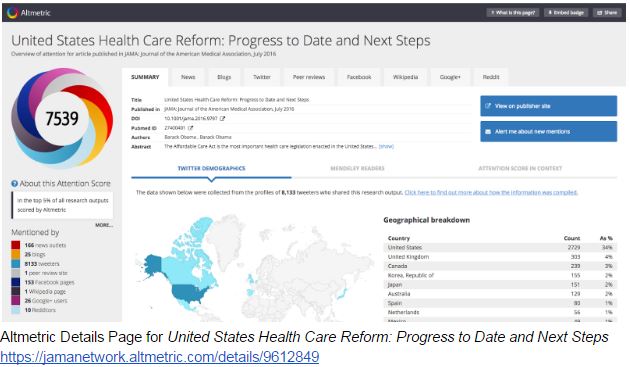
media immediately. We can see in the Altmetric Details Page that it was shared across a broad range of online attentAM1ion
sources such as mainstream media, Twitter, Facebook, Wikipedia and
commented on by several research blogs. We can also see from the stats
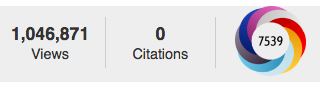
provided by JAMA that the article, at time of writing, has been viewed
over 1 million times and has an Altmetric Attention Score of 7539, but
hasn’t yet received a single citation.


Providing instant feedback


Many altmetrics providers track attention to a research output as
soon as it’s available online. This means institutions can then use
altmetrics data to monitor research engagement right away, without the
delay we often see in the citation feedback loop.


If President Obama was checking his Altmetric Details Page
(which I hope he did!) he’d have known almost in real-time exactly who
was saying what about his article. In the same way, academic research
from your institution is generating online activity  – probably right
now – and can provide extra insights to help enhance your bibliometric
reporting.


AM2


Altmetric, which has tracked mentions and shares of over 5.4m
individual research outputs to date, sees 360 mentions per minute – a
huge amount of online activity that can be monitored and reported on to
help evidence additional signals of institutional research impact. That
said, altmetrics are not designed to replace traditional measures such
as citations and peer-review and it’s valuable report on a broad range
of indicators. Altmetrics are complementary rather than a replacement
for traditional bibliometrics.


Altmetrics reporting: context is key


Using a single number, “This output received 100 citations” or “This
output has an Altmetric Attention Score of 100” doesn’t really say that
much. That’s why altmetrics tools often focus on pulling out the
qualitative data, i.e. the underlying mentions an output has received.
Saying, “This output has an Altmetric Attention Score of 100, was
referenced in a policy document, tweeted by a medical practitioner and
shared on Facebook by a think tank” is much more meaningful than a
single number. It also tells a much more compelling story about the
influence and societal reach of your research. So when using altmetrics
data, zoom in and take a look at the mentions. That’s where you’ll find
the interesting stories about your research attention to include in your
reporting.


How can you use altmetrics to extend your bibliometrics service?


Here are some ideas:


  • Include altmetrics data in your monthly bibliometric reports to
    demonstrate societal research engagement – pull out some qualitative
    highlights
  • Embed altmetrics in your bibliometrics training sessions and welcome emails to new faculty – we have lots of slides you can re-use here
  • Provide advice to researchers on how to promote themselves online and embed altmetrics data in their CV
  • Encourage responsible use of metrics as discussed in the Leiden Manifesto and The Metric Tide
  • Don’t use altmetrics as a predictor for citations! Use them instead
    to gain a more well-rounded, coherent insight into engagement and
    dissemination of your research
Altmetrics offer an opportunity for bibliometricians to extend
existing services and provide researchers with a more granular and
informative data about engagement with their research. The first step is
to start exploring the data – from there you can determine how it will
fit best into your current workflow and activities.


Further reading


Natalia Madjarevic


@nataliafay


Leave a Reply


Why should a bibliometrician engage with altmetrics? Guest Post by Natalia Madjarevic – the Bibliomagician

5 easy ways to improve your article’s visibility and get cited | SAGE Connection – Insight

 Source: http://politicsblog.ac.uk/2016/07/19/5-easy-ways-improve-articles-visibility-get-cited/

5 easy ways to improve your article’s visibility and get cited

Amanda Chisholm


This post originally appeared on the Politics blog July 2016


AmandaSo
you now have your research published. Congratulations. Yet getting
published is only a part of your journey. You now need to start to think
about the dissemination and promotion of your research.


In today’s academic climate, you are competing with roughly 2-million other published articles in any given year—of which only 2/3 of the social science articles actually get cited.
Given this context, you need to actively promote your work both on and
offline. Here are 5 easy ways in improve the visibility of your
research—and get cited.


  1. Have a clear and searchable abstract and title:
    Given that over 50 percent of academic work is found through search
    engines, to ensure you have optimized your searchability on these
    engines, make sure your abstract is clear and captures the core
    arguments of your article. Think about the audience you want to have a
    conversation with and make sure the keywords you attach to your article
    reflect their interests. Include keywords that you think will feature in
    searches relevant to your article and make sure that you have links to
    your article on all your online profiles as well as your institution
    repository. Academia.edu, for example, claim that a link to your article on your Academia profile is likely to improve discoverability and citations.
  2. Have a 30 word sound bite summarising your article and its contribution:
    Promoting your work does not just happen online. Face to face
    conversations are often the best way to get your work recognised.
    Describing your work in a concise way is not easy though, but practising
    the short sound bite will certainly pay off at your next upcoming
    conference/workshop. When you are busy networking with academics and
    practitioners you’ll be able to tell them concisely why they should
    consider reading your work.
  3. Take advantage of Social Media: Post a link to your
    article along with a brief summary of its important contribution onto
    existing social networking communities
    on Facebook, LinkedIn and Twitter. Include a 140 characters or less
    summary of why it’s an important read. Politics helps promote the work of its authors by sharing journal and blog articles with its thousands of Twitter followers and growing number of followers on Linkedin.
  4. Promoting your work through Blogs: Blogs are a great way to get your research discovered. You don’t have to have your own blog. Often journals have a blog that complements their print content. For example, Politics has politicsblog.ac.uk and invites all authors to write a post to promote their article. Ask the editors if
    you can publish a blog post about what your article is about and why
    people should read it. Additionally, approach the administrators of your
    favourite blogs and ask if they are open to publishing a guest blog.
  5. Email and the wider web: add a hyperlink to your
    new article in your email signature line. Do the same, offering a clear
    summary to your article, onto your Academia.edu page, your ORCID iD profile, and university profile webpage and be sure to link all these site together if you haven’t already done so.
Amanda Chisholm is a Lecturer in International Politics at Newcastle University.


5 easy ways to improve your article’s visibility and get cited | SAGE Connection – Insight