Wednesday, 18 December 2013

Journal and Search Alerts


 Source: http://www.libraries.iub.edu/index.php?pageId=3512

Journal and Search Alerts

Many database vendors support alerting services for tables of content and subject and citation searches.
In almost all cases, you must register for a (free) account to create and manage your alerts.
Some vendors will also send you an email message which includes a link you must open to confirm and activate your new account.


ACM Digital Library
Create an account Setting up an ACM Web account is free. With the Web account you establish your username and password, the main entry points to access table-of-contents alerts, binders, and other ACM services. Search Select an item The table of contents option will email the contents of each new Journal issue The binder option will save your search Items will include: Abstract, Authors, References, Cited By, Index Terms, Publication, Reviews Comments, Table of Contents


BioOne
Create an account in BioOne You may use your account to create and use Tables of Contents Alerts Alerts when new content is made available on the site; Alerts when future content listings are announced; and Citation alerts for the journals of your choice. Adding a Title to Your List of Alerts Choose the title(s) from the list of journals, and then select Submit You will now receive email alerts as content for your chosen titles are added to the BioOne site Creating Citation Alerts and Tracking Citations To create an alert and track a citation, select the citation from your list of Favorite Articles Select Track Citation. You will be given an option to subscribe to the RSS Feed for the citation. Select Subscribe to this feed. Your article will now be tracked, and you will receive notices when the article has been cited. Saving Searches You may opt to save frequently executed searches for later use. Give the search term a name and a description; choose if you want to receive alert notices as new articles matching your term are added, and then select Save. You may then run saved searches, remove those searches, and/or monitor how often the searches have been executed.


BMJ
Create an account Search Select an item Under Services you will find: Email to friend Download to citation manager Add article to BMJ portfolio Request permission Email Alerts Email me when this article is cited Email me when responses are posted Email me when a correction is posted Select one (you may select more options in your account) Sign into your account Click on Submit “You can receive a range of email alerts for bmj.com, and can subscribe or unsubscribe at any time, by registering for our alerting services. Some of our alerts are also available as RSS feeds, more information on how to sign up for these can be found on our RSS page” BMJ also offers a Table of Content Service Go to My Account and choose: BMJ Table of Contents (daily) A daily email with links to the latest BMJ articles. BMJ Table of Contents (weekly) A weekly email with links to the latest BMJ articles.


CIAO
Go to “About” on the main page “Receive monthly updates about new content on CIAO. Simply enter your name and your e-mail address in the form below. We will not use your e-mail address for any purpose other than sending news about CIAO, nor we will provide it to any other organization.” Click on Submit


CQ Researcher
To set up an e-mail alert you must first login or create a user profile. Select "Create New Alert" to begin defining your own customized e-mail alerts. Use the "Start/Stop" action to start or stop receiving e-mail alerts you have saved in your account.


EBSCO
Run a search on EBSCOhost and view your search results. Click the Alert/Save/Share link and select E-mail Alert from the resulting pop-up menu. The Create Alert window will appear over the result list. If you have not done so already, click the Sign in link in the alert window to sign into your My EBSCOhost folder. Set your alert parameters and click Save Alert. For table of contents alerts, search a journal title When results show, click on Alert/Save/Share link and select E-Mail Alert. Set your parameters and click on Save Alert


Emerald Journals
Create an account (under Register) Under + Login, log into your Profile account Search Go to Add saved search alert Name the search Click on Add You may create an RSS feed You may manage your alerts For table of contents, you may select a journal title then you will see the options: Content: Latest Issue; Latest Issue RSS; Previous Issues Options: Add Table of Contents Alert; Add to Favorites Emerald will confirm: A table of contents alert for this title has been added. You can manage your alerts in your Emerald profile


Google
Open Google Go to “More” Go to “Even More” Go to Alerts (the bell icon) Click on Alerts and fill out the form with your search, options and email address Click “Create alert” Create an account Sign in to your account With a Google Account you can: Create Alerts without email verification. Change how often an alert is emailed.


Google Scholar
Create an account in Google Scholar Do a search Click on the Alerts icon at the top (the envelope) Sign in Create and name the alert You may also: Using Google Scholar, search for one of your articles For each article, click on "Cited by" Click on the envelope icon in the upper left corner of Google scholar to set up an email alert A message will be sent to your email account asking you to confirm the alert Confirm the alert You will receive an alert when someone cites the articles you selected


Ingenta
Register and create and account In your account, go to searches and alerts TOC Alerts Create new publication alerts: use “add” to choose journal titles to your "new issue alerts" View new content alerts: allows you to see which journals you have selected for alerts You may also view a document and under tools select: Latest TOC, RSS Feed, Recent Issues RSS Feed Search Alerts Do a search Go to My Account Go to Search History Select a search Save as an individual item or put in a folder To create a search alert, view your Saved Searches, check the box next to the search you wish to use, and select Create Alert. Updated search results based on these search terms will be emailed to you weekly.


JSTOR
Create an account (Register for MyJSTOR) Log in with account username and password Search Go to "Save this Search" Search Name: Name the Search Alert Me About New Articles: choose time period Save Alert will be saved


Nature Online Journals
You will need to create an account Go to My Account Go to Register Complete the form You may select Alerts using the form Or Sign into your account Go to Alerts Go to Modify Select the NPG Updates and Table of Contents (TOC) you wish to receive by e-mail. You can opt in or out of alerts at any time Table of Contents (TOC) Alerts Select TOC alerts by general topic or specific journal title Click on “Confirm” “We prefer to send our customers HTML formatted e-mail whenever possible. HTML formatted e-mails provide you with improved design and readability. However, if you wish to receive plain text e-mails instead, please check this box … “ You may also save searches and schedule updates Save search Go to saved searches Complete the form Click on save In My Account, you may select an RSS feed Go to RSS web feeds (at the bottom of the page) Select a journal Complete the information in the form that pops up


Ovid
Create an account Search or log into your account and search Save the search Name the search Choose “Auto Alert” Select preferences from the form, including delivery options email and RSS For Table of contents: Go to journals Select a journal Click on the title On the right you will see your options: RSS and email Complete the forms that pop up Click on subscribe


Oxford Journals
Create a user account Log into your account For Table of Contents alerts: Go to Add/Edit/Delete eTOCs Select journals Click on “Save eTOCS You may also use CiteTrack Alerts CiteTrack can alert you when a specific article is cited or corrected. To add new CiteTrack alerts to your account you should navigate to the article you wish to track, and then click on the 'Alert me when this article is cited' link on the right of the screen. You can also be alerted of articles matching search criteria you specify, such as keyword or author. To create a keyword or author alert, click on the Our Journals link above. Select a journal you are interested in, and then click on CiteTrack Personal Alerts at the top of the page. or Search and select an individual article; you will see in the tools at the right: Email table of contents Email Advance Access CiteTrack XML RSS feed PDA Access You may choose any of the options here


Project Muse
Go to Tools Sign in with your email address Choose Email Alerts Receive weekly e-mail notifications of new journal issues or new titles available in Project MUSE. Choose "Make or Change Selections" to start receiving or to change existing alerts. "View Your Existing Selections" displays a list of your current selections. "Stop Receiving Alerts" discontinues alerts completely. Project MUSE RSS Feeds: Latest Issues (Latest four issues of each journal) Table of Contents (Latest articles in each journal) Upcoming Titles (2012) (Project MUSE® titles launching in 2012) Subscribing to Project MUSE@RSS Feeds To make use of Project MUSE@RSS feeds, you will need an RSS reader. An RSS reader is a web-based or desktop application that automatically gathers feeds from all of your selected websites and makes them available for reading. By using an RSS reader, you can collect in one place the information available through Project MUSE@RSS feeds.


ProQuest databases
Search When search results are returned, select “Create Alert” Name the alert Enter your email address Define the content of the alert Schedule the alert Click on “Create Alert” You will receive an email asking you to confirm the alert service


PubMed
Create a NCBI account (Sign in to NCBI at the top of the screen right) Sign in to your NCBI account Search After results display, go to “Save Search” Name the search and Save Choose how you want the search saved and sent You may also create an RSS feed by clicking on on the RSS icon, naming the feed and clicking on “Create RSS”


SAGE Journals Online
Create an account Sign into your account For Table of Contents Alert: Go to My Tools Go to Alerts Add/edit/delete email alerts Select a journal Click on a “Save” button For a Search Alert Search At the right select “Save as Alert” You may view and modify your alerts


Science.gov
Click on Alerts and create an account Search Click on Create new alert from this search Save alert “The Science.gov ALERTS feature will automatically update you regarding newly available information in your specific area (s) of interest. Simply register for the service, then create a search strategy which will be run against information added to Science.gov . Select a schedule (weekly, monthly, etc.) for receiving the email Alerts. If you are a new patron, Register to learn how to set up Alerts to meet your needs. If you are an existing patron, enter your user name and password in the boxes to login. Once logged in, you may review or modify your search, add a new search and see recent Alerts results.”


ScienceDirect
Create an account Search You will see above the results: Save this search | Save as search alert | RSS Feed Choose Save as search alert Log into your account Name the search Click on “Save Alert” For an RSS feed, click on RSS Feed Complete the forms that pop up For Table of Contents Go to Publications (on the top band) Select a title You will see New Article feed (for RSS) and Alert me about new articles (for email) The email alert is created immediately Complete the information in the forms that pop up for the RSS feed.


SpringerLink
Create an account Search View an article At the bottom right, click on Register for Journal Updates Go to ALERTS FOR THIS JOURNAL Get the table of contents of every new issue published in … Submit You are now subscribed to our TOC alert Manage alerts will allow you to change username and password, email format, language and journal alerting It will also allow you to select additional journal TOCs. You may also create an RSS feed for your search “You are viewing a feed that contains frequently updated content. When you subscribe to a feed, it is added to the Common Feed List. Updated information from the feed is automatically downloaded to your computer and can be viewed in Internet Explorer and other programs.”


Web of Knowledge
Create a personal account With your personal account you can save search results and searches and set up alerts for searches, tables of content, and citations (alerts for each time a specified article is cited). From any Web of Knowledge database, click Register and complete the details. You can create up to 25 searches that are stored in your profile and matched to new citations in the database(s) on a weekly basis. Conduct a search or combine multiple sets until you are satisfied with the results. Click on "Search History" at the top of the screen. Mark in the small box the search you want to act upon. Click on the "Save History". Enter a search history name of your choice, click on Send Me E-mail Alerts, enter your e-mail address. Choose your preferred Alert type, E-mail format Click on Save (to save your search history to the server) then Done. If you prefer, you can save the history locally to your computer to re-run the searches from there. Also note that you can get an RSS feed on the saved history you just set up by clicking on the 'orange' XML button. Then, highlight and copy the complete URL for this page from the address bar at the top of your screen and paste the URL into your RSS reader/aggregator. Tables of Contents Log in to your profile, if you are not already logged in. Search for a particular journal title in an ISI database.ist. Save the search history as described in the Saved Searches section above. Citation Alerts This feature allows you to receive an e-mail alert when articles you select are cited by new articles added to the database. To add an article to this list (and receive an e-mail each time it is cited): Log in to your profile, if you are not already logged in. Search in Web of Science or any of the three Citation databases within Web of Science. When viewing a Full Record, click the "Create Citation Alert" button and then Done. Citation Alerts expire at the end of one year, unless you choose to renew them. To renew or modify Citation Alerts settings, go to "My Cited Articles" List.


Wiley Online
Create an account Search Click on Save search Enter account In the list of saved searches, select one or all Click on “Activate search alert” Listed below are your saved searches. Here you can retrieve, edit, and re-run your saved search to find new or archived material matching your search parameters. You can also take advantage of our convenient alerting service, which will automatically alert you via e-mail, when an article matching your search has been published. New searches can be saved as you search. Table of Contents: You can sign up to receive an e-mail alert containing the table of contents for any Wiley Online Library journals. Simply find publications of interest using Publications or Browse by Subject and choose "Get New Content Alert" from the Journal Tools menu. For journals publishing Accepted and Early View articles, these will be included in your e-mail alerts.
Journal and Search Alerts

Oscillatory Thoughts: How does my online presence impact my citations?

 Source: http://blog.ketyov.com/2013/04/how-does-my-online-presence-impact-my.html

How does my online presence impact my citations?

Someone over on Quora asked this question about me a while back; I think my readers here would appreciate the answer: "Has Bradley Voytek's online presence had an impact on his number of citations?"

Because n = 1 and time is unidirectional, there's no way for me to run an experiment to know the answer to this question. However based upon inferences and converging evidence I would weakly conclude that my "online presence" has probably resulted in an increase in my citation count.

As of right now I have about 17 peer-reviewed journal publications which have been moderately cited (about 300 total citations). My four "main" publications on which I was the primary author, for which I wrote lay-level blog posts about, that I shared on social media, and that were published at least two years ago have been cited a total of 109 times, for an average of 27.25 citations per article. According to an analysis by Times Higher Education on articles published from 2008-2010, on average in this two-year period a neuroscience article will be cited 8.09 times. On the surface this means my papers show a more than three-fold increase in citation rate than the average neuroscience article.

Keep in mind that citation rate is not normally distributed and has a heavy tail, and only about 50-70% of peer-reviewed papers are ever cited at all.

The second piece of evidence that suggests my online presence has improved my citation count is from an informal analysis I did at the journal level. This analysis shows that the number of Facebook page "likes" for a journal, as well as the number of twitter followers the journal has, correlates with the total number of citations the journal receives. Thus, while the causality can certainly be questioned here, one could infer that an individual with more twitter followers would also receive more citations.


The final piece of evidence is from a recent paper by Jason Priem, Heather Piwowar, and Bradley Hemminger, "Altmetrics in the Wild: Using Social Media to Explore Scholarly Impact". Among many of the fascinating findings in this report is that article-level citation count correlates with "social reference saves" on sites such as Mendeley and CiteULike.


The authors also note that, "Articles in the most-tweeted quartile after one week were eleven times more likely to be in the most-cited quartile after two years."

To reiterate, there is no experiment I can run on myself to truly know the answer to this question, but the data converge upon a weak suggestion that yes, my online presence has probably increased my citation count.

Oscillatory Thoughts: How does my online presence impact my citations?

Scientists must share early and share often to boost citations

 Scientists must share early and share often to boost citations
“Publish or perish” is a well-known maxim within academia. It is introduced to researchers early in their careers, often by a PhD supervisor, keen for his or her students to start building a career. While…
A new study shows there are benefits to researchers sharing their data. opensourceway
“Publish or perish” is a well-known maxim within academia. It is introduced to researchers early in their careers, often by a PhD supervisor, keen for his or her students to start building a career.
While we researchers tell ourselves that we publish for important and admirable reasons - to contribute to the global field of knowledge, to expand the field - deep down we all know that, at least in part, we are publishing for selfish reasons.
We want to contribute to our CV and expand our chances of getting a job and grant money. To survive in academia, one must “publish early and publish often”.
Unfortunately, this reality has contributed to a culture of secrecy, especially within the sciences. Being “scooped” is a fear that is often talked about and is usually a major argument against sharing the data underlying research papers.
Niklas Wikström
Click to enlarge
But in these days of “connected science,” “eResearch” and all those other buzzwords and neologisms, can we really afford not to share data?
A paper published overnight by American researchers Heather Piwowar and Todd Vision in the open access journal PeerJ has finally reliably demonstrated what many data sharing advocates have been saying for a long time.
Far from hurting the ability to publish, sharing data in a public repository can actually lead to a tangible benefit to your publication record through increased citations.

Share and share alike

The benefits of data sharing are accepted, at least in theory, by the academic community, but data sharing rates are still low. In a bid to increase rates, research funders have begun to, if not mandate, then “strongly encourage” data sharing practises.
Both the US National Institutes of Health and National Science Foundation now require grant applicants to at least include a data sharing plan in their applications. In Australia, the National Health and Medical Research Council (NHMRC) is a signatory to a joint statement that says some nice things about data sharing, but only in the field of public health.
However, these policies do not yet mandate full data sharing, because, unlike open access publishing, open access data sharing is still seen by the people who generate the thing being made open as a potential threat.
Truly free and open data sharing will only occur when the people that generate the data feel comfortable sharing it. And that will only happen when it can be shown that sharing your data doesn’t hurt your ability to publish.

More citations, please

Citations of your work in other peer-review journal articles are an important factor in determining your track record. They can be thought of (rather crudely) as the intellectual equivalent of Facebook “likes”. Someone who publishes a lot, but isn’t cited often, is like that friend we all have that posts a lot but has nothing interesting to say.
Ksayer1
Click to enlarge
Measuring both the number of papers that someone has published with the number of times that those papers have been cited (as in Hirsch’s h-index), can give a very useful indication of the impact and relevance of their work.
What Piwowar and Vision have shown is that papers that reported on research where the underlying data was made available in a public repository received 9% more citations than similar studies for which the data was not made available.
To arrive at this conclusion they analysed the citation counts of 10,555 papers on gene expression studies that created microarray data. These types of studies routinely generate large amounts of raw data by measuring the activity of sometimes thousands of different genes in multiple samples.
A quarter of the papers analysed in this experiment described studies that made data discoverable in one of the two most widely-used gene expression microarray repositories: the US National Center for Biotechnology Information’s Gene Expression Omnibus and the European Bioinformatics Institute’s ArrayExpress. The remaining 75% merely reported the outcomes of each study’s analysis. The underlying data was not made available for reuse in other studies or to confirm the veracity of the original claims.
opensourceway
Click to enlarge
By comparing the number of citations that papers with and without publicly shared data available, Piwowar and Vision demonstrated a small but significant increase in the number of times papers with data available were cited.
The “citation benefit” has been studied before, but these prior studies have suffered from a number of confounding factors. Citation rates can be affected by a number of things: the journal that published the paper, its impact factor, citation half-life and open access policy, to name a few.
The large size of this new study meant that these factors (43 in total) could be corrected for and the association between data availability and citation rate isolated with more accuracy.
These findings should go someway to helping convince academics that data sharing can have direct personal benefits as well as benefits to their field at large. Most interestingly, the benefit of increased third-party citations appears to persist (six years) beyond the window when most authors publish subsequent papers on the same underlying data (two years).
Sad as it may seem, personal interest may just be the thing that allows academia to transition, as Piwowar and Vision say, to a culture that simply expects data to be part of the published record.

Scientists must share early and share often to boost citations

How to Increase Citations of Your Scientific Articles | The Scientist Videographer

 Source: http://thescientistvideographer.com/wordpress/how-to-increase-citations-of-your-scientific-articles/

How to Increase Citations of Your Scientific Articles

We’re talking about science communication and motivations for scientists to reach a broader audience.  By a broader audience, I’m talking about scientists outside your field,  resource managers (who are often biologists, but do not typically read the scientific literature), students (K-12, undergraduate, graduate), the media, policy-makers, and the general public.  In the last post, I explained how a proven record of communicating science to a diverse audience is essential to meeting funding agency requirements (e.g., the Broader Impacts criterion required for proposals to the National Science Foundation).
In this post, I’d like to provide another incentive:  getting more citations and recognition.
google scholar citations
Most scientists are evaluated based on their publications and more specifically on the numbers of citations their publications receive.  One can argue that such indices are flawed and are not a good way to judge someone but the fact is that search committees and promotion review panels routinely examine the citation record and h-index of candidates.  If you have published a number of papers but they’ve not been cited (except by you and other co-authors), then the conclusion will be that your work is not making an impact on the field.  On the other hand, if your papers have been cited hundreds of times by scientists working in diverse fields, then your work is clearly of general importance to science.  Guess which outcome is going to put you at the top of the list of candidates or ensure your promotion?
This type of information can be acquired by examining the citation record, typically in the Thompson Reuters Science Citation Index (available online through the Web of Science).  Another growing data source for citation analysis is Google Scholar (in case you haven’t checked this out, GS citations does an excellent job of accurately compiling your citations).  The h-index is a measure of both number of publications and number of citations.  The h in the h-index means that a scientist has published h papers, each of which has been cited in other papers at least h times.  By the way, if you don’t have a clue about how many times your publications have been cited or what your h-index is, that’s like a student who doesn’t know their GPA (grade point average).  Without such information, you will not know how you stack up against your competition or whether you need to step up your game.
Bottom line…citations are important.  If people are unaware of your work, they won’t be citing it.  The more students and scientists in other fields who have heard of your research, the more citations you will get.  This is where science communication comes in.  A graduate student, for example, may be writing their first paper or research prospectus about a very specific topic but is looking for more general information to set the background for the study.  They will do a typical literature search but will likely also search on Google, especially if they cannot find a scholarly paper that provides the type of basic information they need to put their work into a broader context. Such information was only available in books when I was a graduate student, and I had to trek to the library and search the stacks for a good basic description of a habitat or a species, which simply was not available in single research articles (and even if it was, it was not written in everyday language that I could comprehend).  Nowadays, this type of basic information is everywhere on the internet, and students, in particular, are likely to search for it on the Web.
Let’s take a look at an example of how a non-technical communication product about a research effort can lead people to your technical articles, which they then will be more likely to cite in their technical paper.
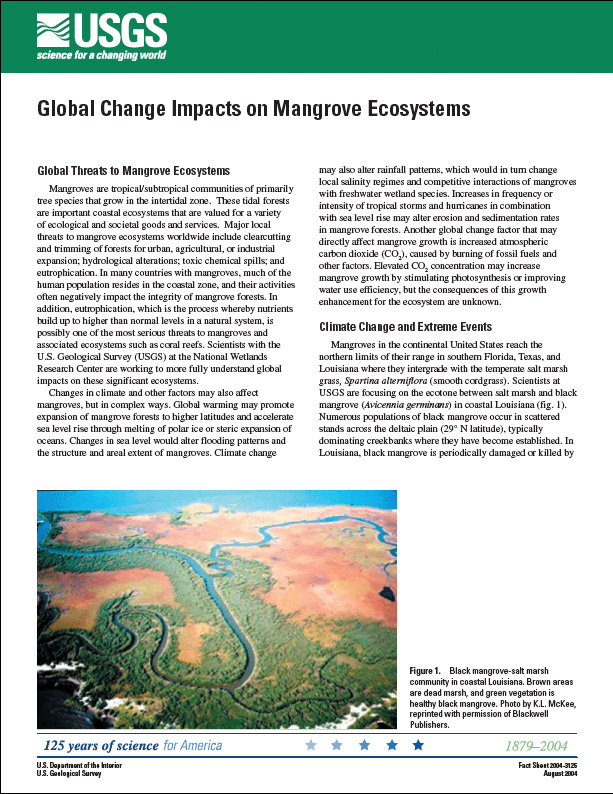
First, I’ll use a text-based communication example.  Government agencies routinely produce science communication products geared toward general audiences.  The agency I worked for uses “fact sheets” to summarize information about a science topic or a recent research finding….written in everyday language.  I wrote several of these fact sheets, which turned out to be much more popular than any of my technical publications. One of these summarized my work on global change impacts on mangroves (a type of coastal wetland).  If you conduct a Google search on the terms global change and mangrove, my fact sheet pops up near the top of the list (see screenshot below).

Note that my fact sheet, unlike the scholarly articles listed above it, is available for free.  All one has to do is click on the link, and the viewer is taken to a webpage with the entire fact sheet, including a link to download a pdf of the article (see photo below).
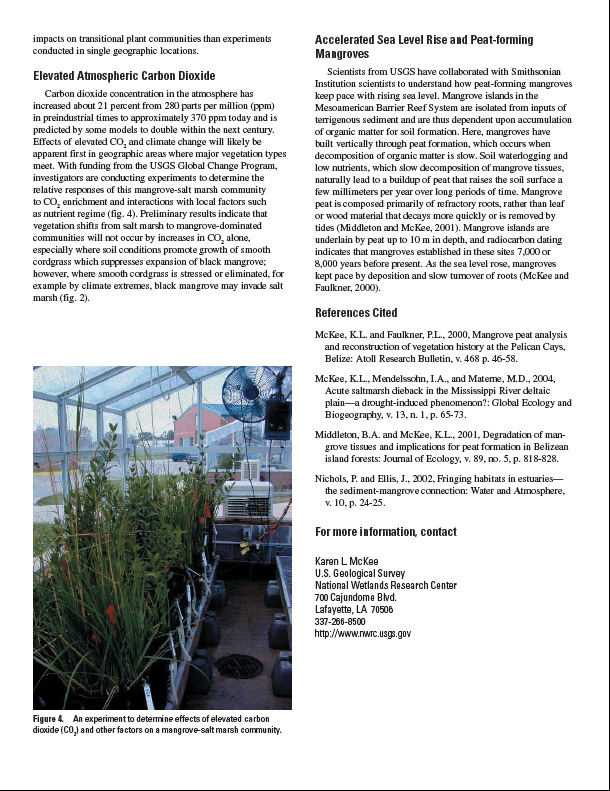
The scholarly articles listed above it on the search page are all good sources of information about mangroves and global change, but you need a subscription to the journal (or pay $35 or more) to read it.  Which one do you think students, in particular, will be likely to read first?  As for citations, I provide several references to my own peer-reviewed journal articles at the end of the fact sheet as well as a clickable link to my email address so that whoever wishes to get copies of those scholarly articles can easily contact me (see photo below).
Not only will such non-technical articles lead people to your technical papers, but they will generally raise your scientific profile on the internet.  In the next posts, I’ll show how videos and other audiovisual items will make you visible when your text-based links will not.

2 thoughts on “How to Increase Citations of Your Scientific Articles”


How to Increase Citations of Your Scientific Articles | The Scientist Videographer

SAGE - the natural home for authors, editors and societies - Journal Gateway

 Source: http://www.sagepub.com/journalgateway/usage.htm

10 Ways to Increase Usage and Citation of your Article Using Social Media   Journal Author Gateway

As readers' expectations change, it is important that your article is visible where the user starts their search. Below are some of the social media sites that SAGE recommends for promoting your article and other channels that will offer a direct way to reach your readership.

1. Contribute to Wikipedia

WikipediaWe recognize that many students are increasingly using Wikipedia as the starting pointfor their research. If there are pages that relate to themes, subjects or research that your article covers, add your article as a reference, with a link to it on SAGE Journals Online. If there isn't a page in existence, why not create one. You can find out how here: http://en.wikipedia.org/wiki/Wikipedia:Your_first_article
 

2. Join Twitter

TwitterTwitter is a micro-blogging service that enables its users to send and read messages known as tweets. Authors are increasingly promoting their content via twitter which is then picked up by other researchers and practitioners depending on their search parameters. Look at the example here. Senders can restrict delivery to those in their circle of friends or, by default, allow open access. Twitter allows you to set up search terms to enable you to monitor what is being talked about in your areas of interest: You can then comment on the relevant conversations. The more you engage, the more people will follow you to listen to your comments and recommendations. As followers come to you, rather than you approaching them, Twitter is an ideal way to reach new audiences.
SAGE's guidelines for how to use Twitter are available here.

3. Add content to YouTube

YouTubeContent is, of course, no longer as narrow as text and figures. It also includes user-generated content and multi-media content such as podcasts and videos. We are seeing an increasing amount of traffic to our journal sites via YouTube as students use video as an initial way of researching a topic. If you already have video content relating to your specific journal article, please let us know and we will add it to our SAGE YouTube channel.

Word Press4. Start blogging

Wondering what to write about? How about:
  1. Your area of research and papers that you have published – and/or other related papers in your field of research. Don't forget to link to them from your blog!
  2. Conferences and training events that you're due to speak at.
  3. Your last conference – were there any interesting questions that came up?
  4. What do you think of any recent press coverage of your subject area?
  5. Ask your colleagues and co-researchers to guest blog and stimulate debate.
Blogspot The more you write, the higher your page will appear in search engine results pageswhen researchers are searching for content – especially as they are increasingly using Google Scholar. SAGE will provide a blogging template and guidelines – please contact us if you would like further information.


5. Join academic social networking sites

MyNetResearchAcademiciAcademia
Academics, researchers and practitioners are increasingly using social communities as a way of meeting and conversing with people who share the same research interests. These sites offer an immediate way to monitor what other people are looking at in your field of research or as a way to commission papers around online conversations you think are interesting. If there aren't any groups talking about your research interests – set one up. Take a look at MyNetReseach , Academia and Academici for example. There are others too, perhaps you can ask your colleagues which they are part of to decide what suits you best.

6. Create your own website

GoogleSites
Do you have your own website? If not, create one! You can create a very clean and simple site using Google sites. SAGE will provide guidelines on how to engage with your audience using social media functionality.

7. Utilize social bookmarking with CiteULike


CiteULikeCiteULike is a free service to help you to store, organize and share the scholarly papers you are reading. When you see a paper on the web that interests you, you can click one button and have it added to your personal library.CiteULike automatically extracts the citation details, so there's no need to type them in yourself. It all works from within your web browser so there's no need to install any software. Because your library is stored on the server, you can access it from any computer with an Internet connection.


8. Join Methodspace


MethodspaceSponsored by SAGE, Methodspace is an online community for researchmethods. On the site, you can connect with other researchers, discuss methodology issues and controversies, Discover and review new resources, find relevant conferences and events, and share and solve methodology problems.  SAGE has also launched community spaces in criminology (Crimspace) and communication studies (Communicationspace).

9. Join LinkedIn


LinkedInLinkedIn is an interconnected network of experienced professionals from around the world with over 55 million members. It is not just for career opportunities. When you create your profile that summarizes your professional expertise and accomplishments, why not include a mention of your articles?

10. Join Facebook

FacebookFacebook lets users add friends and send them messages, and update their personal profiles to notify friends about themselves. Additionally, users can join networks organized by city, workplace, and school or college. You can also join and create groups according to your interests or areas of expertise.

While social media is increasing in importance, there are other options to draw attention to your latest work: email your networks or post on listservs and websites about your recent publication, and add your article to your course reading list (if appropriate).

SAGE - the natural home for authors, editors and societies - Journal Gateway